


Introduction: Why I Turned to BPMN (And Why You Might Too)
As a business analyst who’s spent years navigating the messy intersection of stakeholder expectations, technical constraints, and operational realities, I’ll be honest: I used to dread process documentation. Flowcharts in Visio felt static. Text-based specifications gathered dust. Communication gaps between business and IT teams seemed inevitable. Then I discovered Business Process Model and Notation (BPMN).
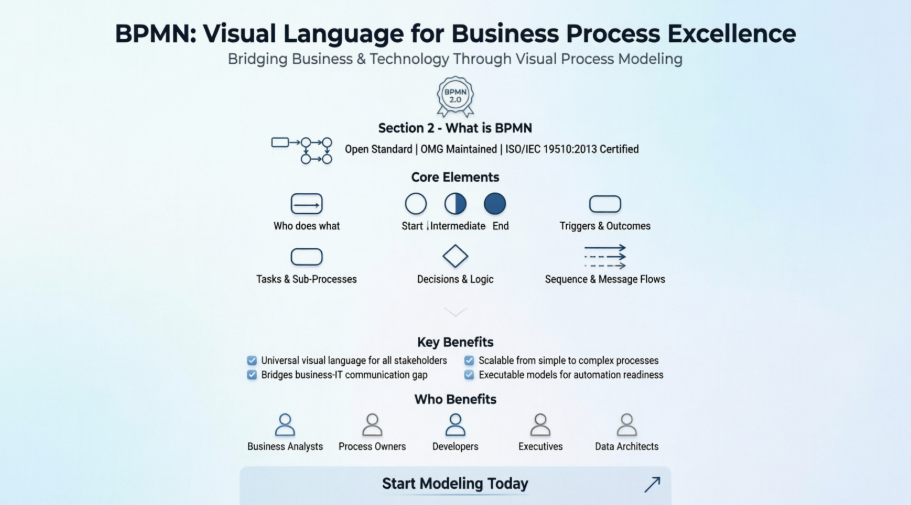
This isn’t just another modeling standard—it’s become my go-to framework for turning ambiguous workflows into shared visual languages that everyone from C-suite executives to developers can understand. In this review-style guide, I’m sharing my hands-on experience with BPMN: what works, what trips people up, and how it’s transformed the way I collaborate on process improvement initiatives. If you’re evaluating whether BPMN deserves a place in your toolkit, consider this your field-tested perspective.
My First Encounter with BPMN: More Than Just Pretty Boxes
When I first opened a BPMN diagram, I was struck by how intuitive it felt. Unlike UML diagrams that often require technical training to decode, BPMN’s visual grammar speaks to both business users and technologists. The “Place Order online” example below perfectly illustrates why:
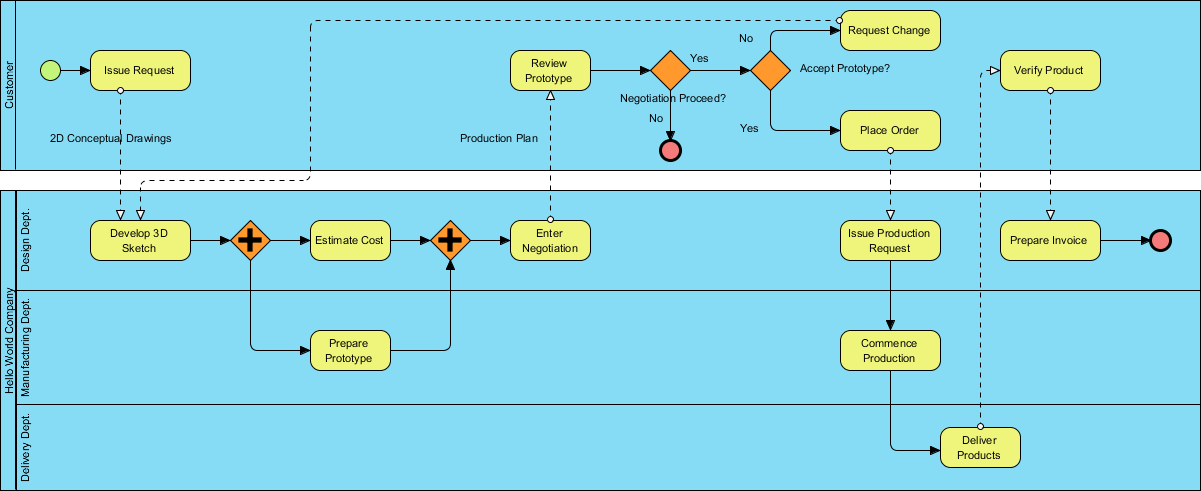
What resonated with me immediately: stakeholders who previously glazed over during process reviews were suddenly asking insightful questions. The visual clarity wasn’t just aesthetic—it was functional. Everyone could see where bottlenecks lived, where handoffs happened, and where automation might help.
Understanding BPMN’s Evolution: A Brief History (From a Practitioner’s Lens)
I appreciate that BPMN isn’t some academic experiment—it’s a mature, industry-backed standard. Learning that it originated with the Business Process Management Initiative (BPMI) in 2004, then merged with the Object Management Group (OMG) in 2005, gave me confidence in its longevity. The fact that BPMN 2.0.2 is now formally published as ISO/IEC 19510:2013 means I’m not betting my projects on a fleeting trend.
For practitioners like me, this maturity translates to:
-
Better tool support across vendors
-
More community resources and templates
-
Reduced risk of investing time in learning a “dead” standard
The Real-World Benefits I’ve Experienced with BPMN
After using BPMN across multiple projects, these benefits stand out as genuinely impactful:
✅ Bridging the business-IT gap: I’ve watched non-technical stakeholders confidently critique process flows because the notation is accessible. No more “translating” requirements between departments.
✅ Standardization without rigidity: As an OMG consortium standard, BPMN provides consistency while remaining flexible enough for diverse industries.
✅ Scalable complexity: I can sketch a high-level executive view in minutes, then drill into technical details for developers—all within the same notation framework.
✅ Future-proof documentation: Because BPMN diagrams are executable in some tools, my process models can evolve from documentation to automation assets.
Breaking Down BPMN Notation: What Actually Works in Practice
Swimlanes: Organizing Responsibilities Visually
Swimlanes transformed how I assign accountability. Instead of vague “the team will handle this” statements, I can visually partition work:

Pro tip from my experience: Use pools for external entities (like customers or third-party systems) and lanes for internal roles. The blackbox pool concept (shown below) is brilliant for scoping—focus on what matters to your process without getting distracted by external internals.

Flow Elements: The Heartbeat of Process Modeling
Flow elements—Events, Activities, and Gateways—are where the magic happens. Here’s how I use them:

Events (circles) mark triggers and outcomes. I always start diagrams with a clear Start Event—it anchors the entire flow. Intermediate Events help model real-world interruptions (like “payment failed”), while End Events provide closure.

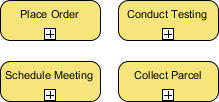
Activities (rounded rectangles) represent work. I use Tasks for atomic actions and Sub-Processes when I need to hide complexity until stakeholders ask for details:

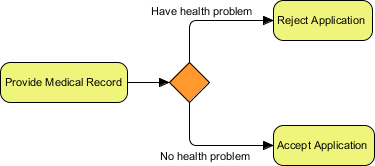
Gateways (diamonds) control flow logic. My go-to: Exclusive Gateways for “if/then” decisions, Parallel Gateways for concurrent tasks. The visual distinction prevents logic errors that plague text-based specs.


Connecting Objects: Making the Links That Matter
Connecting Objects tie everything together. The distinction between Sequence Flows (solid lines, same pool) and Message Flows (dotted lines, across pools) is critical:


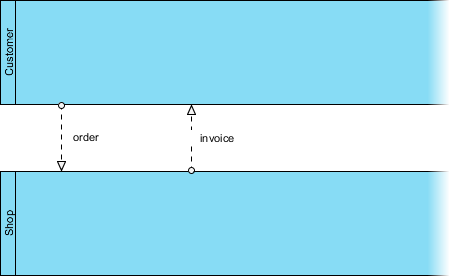
Lesson learned: I once confused these two early in my BPMN journey, creating a diagram that implied internal workflow where external communication was needed. Now I double-check: solid line = same team/system; dotted line = handoff to another entity.
Data Elements: Tracking Information Flow
Data objects help me document what information moves through a process—critical for compliance and system design:

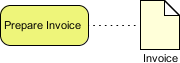
I particularly value Data Stores for showing where information persists (like databases or document repositories). This visual cue helps technical teams anticipate integration points.
Supporting Elements: Groups and Annotations
Groups (dotted boxes) and Text Annotations don’t affect process logic but add crucial context:


My workflow: I use annotations to capture business rules that don’t warrant a full gateway (“Discount applies only to orders over $100”) and groups to highlight process phases for executive reviews.
A Real Project Case Study: The True Aqua Distilled Water Company
One of my most rewarding BPMN projects involved The True Aqua Distilled Water Company, which aimed to grow market share from 5% to 10%. Their ordering process was a mix of phone calls (90%) and emails (10%), with manual handoffs causing delays.
Using BPMN, I modeled their “as-is” process, then collaborated with stakeholders to design a “to-be” version. The visual diagram made pain points obvious:

Key insights from the diagram:
-
Customer service assistants were duplicating data entry for new customers
-
Logistics scheduling happened in batch mode (Wednesdays only), creating delivery delays
-
No visibility into order status for customers
By walking through this BPMN diagram with cross-functional teams, we prioritized automation opportunities and redesigned handoffs. The result? A 30% reduction in order processing time and higher customer satisfaction scores. This project cemented my belief that BPMN isn’t just documentation—it’s a catalyst for change.
Tools That Made My BPMN Journey Smoother
While BPMN the notation is powerful, the right tooling amplifies its value. Based on my hands-on experience, here are features that genuinely move the needle:
Process Drill-Down and Sub-Process Management


Being able to collapse complex sub-processes for executive views, then expand them for technical deep-dives, keeps diagrams readable at every stakeholder level.
Integrating BPMN with Other Modeling Standards


I love linking BPMN workflows to UML class diagrams for system design or wireframes for UI planning. This holistic view prevents siloed thinking.
Working Procedure Editor for Detailed Specifications
While the BPD gives the bird’s-eye view, the working procedure editor lets me document step-by-step instructions for individual tasks. Exporting combined diagrams + procedures creates self-contained playbooks for operations teams.
As-is and To-be Process Modeling for Transformation Projects

Maintaining traceability between current and future state models helped me demonstrate ROI to leadership. Seeing the “before and after” side-by-side made change management conversations much smoother.
RACI & CRUD Charts: Assigning Accountability Visually

Generating RACI charts directly from BPMN diagrams saved me hours of manual matrix-building. Automatically assigning “Responsible” roles based on swimlane placement reduced ambiguity in team handoffs.
Process Animation and Simulation: Bringing Diagrams to Life


Animating process flows helped stakeholders “feel” bottlenecks. Simulation features let me test resource allocation scenarios before implementing changes—reducing costly trial-and-error in production.
Note: Advanced features like animation, simulation, and RACI chart generation typically require professional-tier tools (e.g., Visual Paradigm Standard/Professional/Enterprise editions), but the core BPMN notation remains accessible with free or open-source tools.
Conclusion: Why BPMN Earned a Permanent Spot in My Toolkit
After years of experimenting with process documentation methods, BPMN stands out as the rare standard that delivers on both clarity and capability. It’s not perfect—there’s a learning curve, and over-engineering diagrams is a real risk—but when applied thoughtfully, it transforms how teams collaborate on process improvement.
My advice for fellow practitioners:
🔹 Start simple: Model one core process end-to-end before tackling enterprise-wide workflows
🔹 Focus on communication: If a stakeholder can’t understand your diagram in 60 seconds, simplify it
🔹 Leverage tooling wisely: Use advanced features (simulation, RACI) when they solve real problems, not just because they’re available
🔹 Keep iterating: BPMN diagrams should evolve as processes do—treat them as living artifacts, not one-time deliverables
Whether you’re a business analyst, product owner, or operations leader, BPMN offers a shared visual language that turns process ambiguity into actionable clarity. In my experience, that’s not just valuable—it’s indispensable.
Reference List
- BPMN.org Official Site: The official resource for Business Process Model and Notation standards, documentation, and community updates.
- Object Management Group (OMG): The international consortium that maintains and evolves the BPMN specification alongside other modeling standards.
- BPMN 2.0.2 Specification: The detailed technical specification for BPMN version 2.0.2, published by OMG for implementers and advanced practitioners.
- ISO/IEC 19510:2013 Standard: The formal ISO publication of BPMN 2.0.2, establishing it as an international standard for business process modeling.
- Visual Paradigm BPMN Tools: Professional BPMN modeling software featuring diagramming, simulation, animation, and integration capabilities for enterprise process design.
- Visual Paradigm Free Download: Access to free trials and community editions of Visual Paradigm’s modeling suite, including BPMN support.
- Visual Paradigm UML Tool: Complementary UML modeling capabilities that integrate with BPMN for holistic system and process design.
- Visual Paradigm ERD Tools: Entity-Relationship Diagram tools that can be mapped alongside BPMN processes for data-aware workflow design.
- Visual Paradigm Wireframing Tools: UX design and wireframing features that integrate with BPMN to connect process flows with user interface specifications.
- Visual Paradigm Standard Edition: Mid-tier licensing option offering advanced BPMN features like process animation, RACI charts, and as-is/to-be modeling.
- Visual Paradigm Professional Edition: Enhanced edition with simulation, advanced reporting, and team collaboration features for BPMN practitioners.
- Visual Paradigm Enterprise Edition: Full-featured enterprise licensing with governance, repository management, and large-scale deployment support for BPMN initiatives.