


Introduction
Welcome to the world of Business Process Modeling Notation (BPMN)! If you’re new to process modeling, business analysis, or workflow design, you’ve come to the right place. BPMN is the universal language that helps businesses visualize, understand, and improve how work gets done—from simple tasks to complex enterprise workflows.
This beginner-friendly guide will walk you through everything you need to know to get started with BPMN. Whether you’re a business analyst, project manager, developer, or stakeholder, you’ll learn how to read, create, and leverage BPMN diagrams to drive clarity, collaboration, and continuous improvement in your organization. No prior experience required—just curiosity and a willingness to learn!
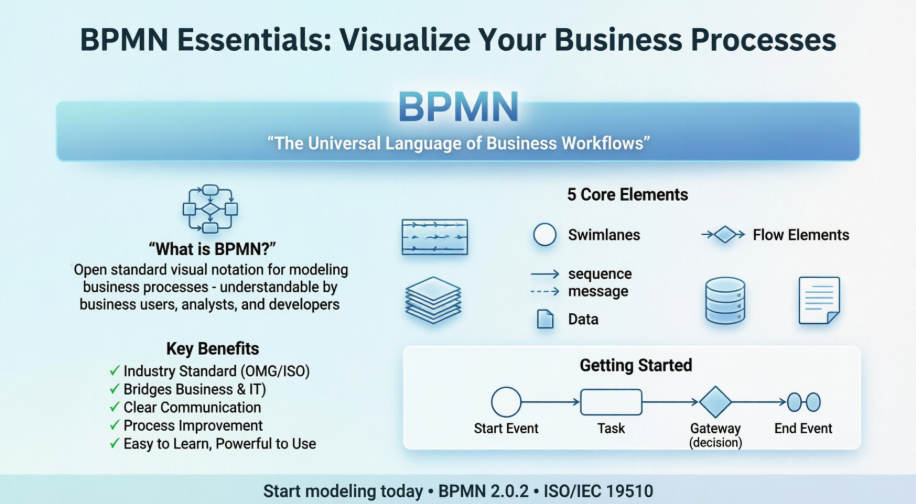
What is BPMN?
The Business Process Modeling Notation (BPMN) is a visual modeling language for business analysis applications and specifying enterprise process workflows. It is an open standard notation for graphical flowcharts used to define business process workflows.
BPMN is popular and intuitive—designed to be easily understood by all business stakeholders, including:
-
Business users
-
Business analysts
-
Software developers
-
Data architects
By providing a common visual language, BPMN bridges the gap between business strategy and technical implementation.
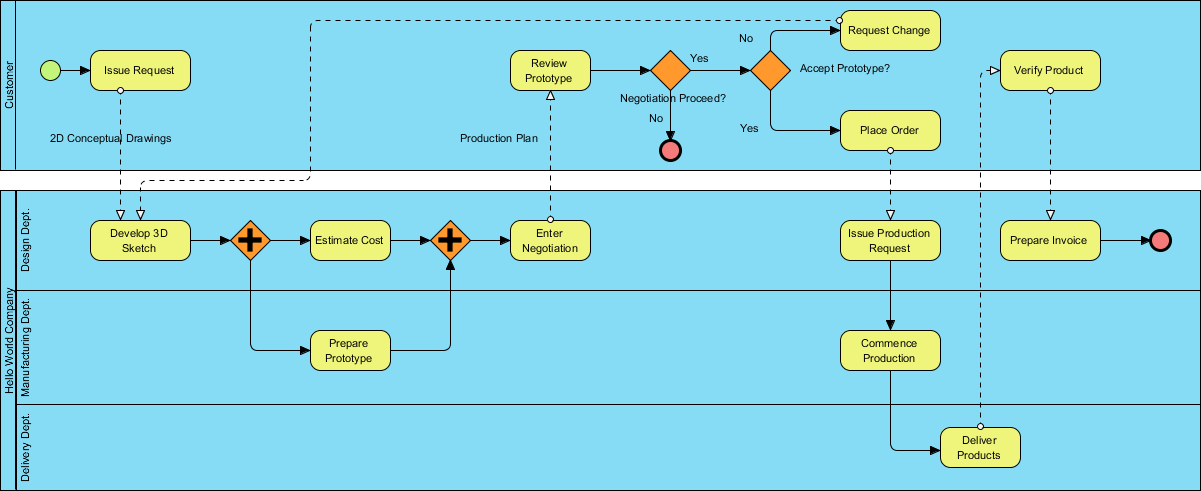
History of BPMN
Understanding BPMN’s evolution helps appreciate its robustness:
-
2004: Originally published by the Business Process Management Initiative (BPMI)
-
2005: BPMI merged with the Object Management Group (OMG)
-
February 2006: OMG released the first BPMN Specification document
-
2010: Version 2.0 of BPMN was developed
-
December 2013: The current specification version was released
-
Latest: BPMN 2.0.2 formally published by ISO as standard ISO/IEC 19510
This standardization ensures consistency, interoperability, and long-term support across tools and organizations.
Benefits of BPMN
Why should you invest time in learning BPMN? Here are the key advantages:
✅ Industry Standard: Developed and maintained by the OMG consortium, a not-for-profit industry group
✅ Clarity & Consistency: Capture and document business processes in a clear, standardized way
✅ Stakeholder Alignment: Ensures process owners, business users, and technical teams are on the same page
✅ Communication Bridge: Connects business process design with technical implementation
✅ Accessible Yet Powerful: Simple to learn, yet robust enough to model complex workflows
✅ Problem Identification: Helps teams respond to process issues more effectively
The Goal of BPMN
BPMN serves three primary audiences:
🎯 Technical Experts: Responsible for process implementation and system integration
🎯 Business Analysts: Create, analyze, and continuously improve business processes
🎯 Managers: Monitor, control, and optimize process performance
By speaking a common visual language, these groups collaborate more effectively toward shared business outcomes.
Overview of BPMN
Knowing how your business operates is the first—and most critical—step in process improvement. BPMN provides a graphical representation of business workflows that anyone, from business analyst to executive stakeholder, can easily understand.
Any process described with BPMN is represented as a series of steps (activities) performed sequentially or in parallel according to defined business rules.
For example, consider a “Place Order Online” process for an e-commerce store:
This visual approach aids in business process analysis, documentation, and continuous improvement initiatives.
BPMN Notation: The Building Blocks
BPMN diagrams use a series of graphic elements to describe processes. This visual presentation makes it easy for users to understand process logic. The BPMN standard classifies graphic elements into intuitive categories, making them easily recognizable.
Basic Constructs: Five Core Categories
There are five fundamental categories of BPMN elements, each representing a unique aspect of a business process:
1. Swimlanes

Swimlanes are graphical containers that represent participants in a process. There are two types:
-
Pools: Represent major participants (e.g., departments, organizations, external entities)
-
Lanes: Sub-partitions within pools (e.g., roles like “Manager” or “Clerk”)
Swimlanes may be arranged horizontally (flow: left→right) or vertically (flow: top→bottom)—semantically identical, just different visual orientations.
2. Flow Elements

Flow elements connect to form business workflows and define process behavior. There are three kinds:
-
Events: Things that happen (start, intermediate, end)
-
Activities: Work performed (tasks, sub-processes)
-
Gateways: Decision points that control flow paths
3. Connecting Objects

Connectors link flow objects to form coherent flows. Four types exist:
-
Sequence Flows: Solid lines with arrows showing order within a pool
-
Message Flows: Dotted lines showing communication between pools
-
Associations: Link artifacts or text annotations to flow objects
-
Data Associations: Connect data elements to activities
4. Data

Data represents information needed or produced during process execution. Four kinds:
-
Data Objects: Information used/created during the process
-
Data Inputs: Data required to start an activity
-
Data Outputs: Data produced by an activity
-
Data Stores: Persistent data repositories (e.g., databases, files)
5. Artifacts
Supplementary elements that add context without affecting flow:
-
Groups: Dotted boxes to categorize related elements
-
Text Annotations: Notes that explain details without changing logic
Deep Dive: Key BPMN Elements
BPMN Swimlanes: Pools and Lanes
Swimlane objects are rectangular boxes representing process participants. They may contain flow objects performed by that participant (except “black box” pools, which remain empty).
Pools
Pools represent participants in a business process—either specific entities (e.g., “Accounting Department”) or roles (e.g., “Approver,” “Customer”).
Black Box Pools: Used for external entities whose internal processes aren’t relevant to your model. For example, if modeling a chef’s meal preparation, the “Customer” pool might be a black box since their actions don’t impact the chef’s workflow.

💡 Tip: Use black boxes to simplify diagrams when external details aren’t needed. Flip perspectives as needed—if modeling customer ordering, the “Chef” becomes the black box.
Lanes
Lanes are sub-partitions within pools. Example: A “Department” pool might contain lanes for “Department Head” and “General Clerk.”
Lanes can be nested for complex organizational structures—but remember: BPMN models processes, not org charts. Use organization diagrams for structural modeling.
Activities: Tasks and Sub-Processes
Activities represent work performed within a business process, shown as rounded rectangles with descriptive names.
Tasks
Used for atomic work that cannot (or need not) be broken down further.

Sub-Processes
Used for complex work that can be elaborated into smaller steps. A sub-process typically links to another BPMN diagram detailing its internal flow.
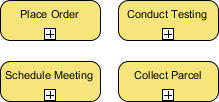
💡 Tip: Choose task vs. sub-process based on your audience’s needs. A customer doesn’t need payment processing details; your finance team does.
Events: Start, Intermediate, and End
Events are occurrences that impact a process, shown as circles (often with icons indicating trigger types).
| Event Type | Purpose | Symbol |
|---|---|---|
| Start Event | Marks process beginning | Thin circle |
| Intermediate Event | Occurs during process flow | Double circle |
| End Event | Marks process completion | Thick circle |
Triggers can be specified (e.g., message received, timer elapsed, error occurred).

Example logic: “When order received → process order → if credit limit exceeded → investigate issue → end when processed or problem identified.”
Gateways: Controlling Process Flow
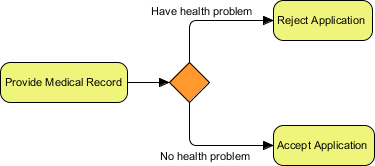
Gateways (diamond shapes) evaluate conditions and direct flow paths.
Data-Based Exclusive Gateway (XOR)
Routes flow based on data conditions. Only one outgoing path is taken.
Inclusive Gateway (OR)
Evaluates all conditions; multiple paths may be taken if conditions are met.

Parallel Gateway (AND)
Executes all outgoing flows simultaneously—no conditions evaluated.

Event-Based Gateway
Waits for one of several events to occur; the first triggered event determines the path.

💡 Tip: Label gateway outgoing flows with clear conditions (e.g., “Credit Approved,” “VIP Customer”) to improve readability.
Connecting Objects: Sequence vs. Message Flows
Sequence Flows
Solid lines with arrowheads showing order of execution within the same pool.

✅ Use for: Connecting activities, events, gateways within one participant’s workflow
❌ Never use to connect across different pools
Message Flows
Dotted lines with open arrowheads showing communication between pools.
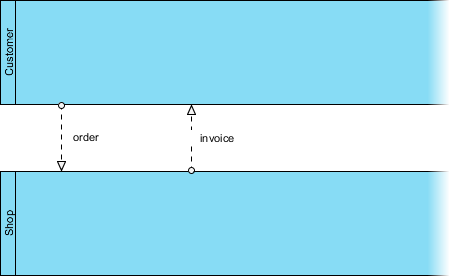
✅ Use for: Emails, phone calls, API requests, documents exchanged between participants
💡 Remember: Message flows represent communication, not control flow
Data Elements in BPMN
Data objects model information produced or consumed during process execution (e.g., purchase orders, invoices, receipts).
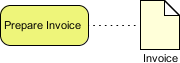
BPMN supports data state management (instantiated, completed, deleted) and clear associations with activities via data associations.
Groups and Text Annotations
Groups
Dotted-border boxes to visually cluster related elements by category (e.g., “Compliance Steps,” “Optional Activities”). Does not affect flow logic.

Text Annotations
Notes attached to flow objects to add explanatory detail without altering process behavior.

💡 Best Practice: Use annotations for business rules, SLAs, or references—not for core process logic.
BPMN in Action: True Aqua Distilled Water Company Example
Let’s apply BPMN to a real-world scenario.
Context: True Aqua Distilled Water Company wants to grow market share from 5% to 10% in 12–18 months by improving ordering efficiency and customer satisfaction.
Process Overview:
-
Customers order via phone (90%) or email (10%)
-
Customer service checks if customer is new or existing
-
New customers get an account created
-
Every Wednesday, orders are forwarded to Logistics
-
Logistics manager assigns workers, prints schedules
-
Workers deliver water to customers

This diagram clearly shows:
-
Pools: Customer, Customer Service, Logistics Department
-
Events: Order received, Delivery completed
-
Gateways: New vs. existing customer decision
-
Sequence flows: Order of operations
-
Message flows: Communication between Customer and internal teams
💡 Beginner Exercise: Try sketching this process on paper first, then map each element to BPMN symbols. Start simple—add complexity gradually.
Tips and Tricks for BPMN Beginners 🚀
✅ Start Simple
-
Model one process at a time
-
Use only essential elements initially (start/end events, tasks, sequence flows)
-
Add gateways, events, and data as needed
✅ Name Everything Clearly
-
Use verb-noun phrases for tasks: “Validate Order,” “Send Confirmation Email”
-
Label gateway conditions explicitly: “Credit Approved?”, “VIP Customer?”
-
Keep names consistent across diagrams
✅ Follow Flow Direction
-
Horizontal diagrams: left → right
-
Vertical diagrams: top → bottom
-
Avoid crossing lines; use swimlanes to organize complexity
✅ Use Swimlanes Strategically
-
Assign one role/department per lane
-
Use black boxes for external entities you don’t control
-
Don’t over-nest lanes—focus on process, not org structure
✅ Validate Before Sharing
-
Ensure every start event has a corresponding end event
-
Check that gateways have balanced incoming/outgoing flows
-
Verify message flows only connect pools, sequence flows stay within pools
✅ Leverage Tool Features
-
Use sub-processes to hide complexity until needed
-
Add annotations for business rules or exceptions
-
Export to PDF/PNG for stakeholder reviews
✅ Collaborate Early
-
Review diagrams with both business and technical stakeholders
-
Use BPMN as a conversation starter, not just documentation
-
Iterate based on feedback—process modeling is iterative!
❌ Common Pitfalls to Avoid
| Mistake | Solution |
|---|---|
| Over-complicating the first draft | Start with happy path; add exceptions later |
| Mixing sequence and message flows | Remember: sequence = within pool, message = between pools |
| Ignoring error handling | Add error events for critical failure points |
| Using BPMN as an org chart | Focus on what happens, not who reports to whom |
| Skipping validation | Use tool checks or peer reviews to catch logic gaps |
Conclusion
Congratulations—you now have a solid foundation in Business Process Modeling Notation (BPMN)! 🎉
BPMN empowers you to:
🔹 Visualize complex workflows in an intuitive, standardized way
🔹 Communicate clearly across business and technical teams
🔹 Analyze processes to identify bottlenecks and improvement opportunities
🔹 Document procedures consistently for training, compliance, and automation
Remember: BPMN is a language, not just a diagramming technique. Like any language, fluency comes with practice. Start small, model real processes you understand, and gradually expand your toolkit.
Whether you’re optimizing a customer onboarding flow, designing a new approval workflow, or preparing for process automation, BPMN gives you the visual vocabulary to turn ideas into actionable, shareable models.
Your Next Steps:
-
Download a free BPMN tool (like Visual Paradigm Community Edition)
-
Model a simple process you know well (e.g., “Submit Expense Report”)
-
Share it with a colleague for feedback
-
Iterate, learn, and scale up!
The journey to process excellence starts with a single diagram. Happy modeling! 🗺️✨
References
-
What is BPMN? | Visual Paradigm: Comprehensive guide to BPMN concepts, notation, and practical modeling techniques using Visual Paradigm’s professional toolset.
-
Process Design Tool | Visual Paradigm: Overview of Visual Paradigm’s capabilities for end-to-end business process design, analysis, and optimization.
-
BPMN Guide | Visual Paradigm: Detailed tutorial series covering BPMN notation, best practices, and step-by-step modeling examples.
-
Mastering BPMN with Visual Paradigm | Archimetric: Professional guide bridging BPMN conceptual design with technical execution and tool implementation.
-
BPMN Tools & Solutions | Visual Paradigm: Solution-focused overview of BPMN tooling for business process management, including modeling, simulation, and reporting features.
-
BPMN Tutorial for Beginners | Visual Paradigm: Entry-level tutorial walking new users through creating their first BPMN diagram with practical examples.
-
Visual Paradigm: All-in-One Software | VP Blog: Article highlighting Visual Paradigm’s integrated platform for software development, including BPMN, UML, and agile modeling.
-
Introduction to BPMN Using Visual Paradigm | Archimate Blog: Beginner-friendly introduction to BPMN fundamentals with Visual Paradigm tool walkthroughs.
-
BPMN Made Easy | Visual Paradigm: Simplified approach to BPMN modeling with templates, shortcuts, and guided workflows for faster adoption.
-
Business Process Modeling | Visual Paradigm: Enterprise-focused resource on business process modeling methodologies, governance, and tool integration.
-
Visual Paradigm User Guide: BPMN Reference: Official documentation detailing BPMN element properties, configuration options, and advanced modeling techniques.
-
BPMN Notation Overview | Visual Paradigm: Concise reference guide to all BPMN 2.0 symbols, semantics, and usage rules.
-
Desktop & Online Accessibility | Visual Paradigm: Information on Visual Paradigm’s deployment options—desktop application for Windows/macOS/Linux and zero-configuration web-based service.