


Introduction
In today’s fast-paced digital transformation landscape, one of the most persistent challenges I’ve witnessed across organizations is the communication gap between business stakeholders and development teams. Business analysts speak in workflows, customer journeys, and process efficiencies, while developers think in classes, objects, and system interactions. For years, I watched projects stall because these two worlds operated in silos—until I discovered a platform that promised to bridge this divide.
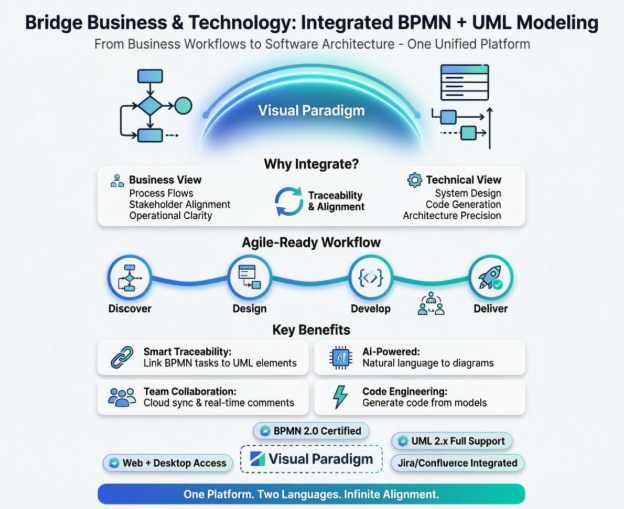
This article shares my hands-on experience exploring how BPMN and UML can coexist, why their integration matters for Agile teams, and how Visual Paradigm has transformed the way I approach end-to-end solution design. Whether you’re a BA, a developer, or a product leader, this guide walks through practical insights, real-world examples, and lessons learned from adopting an integrated modeling approach.
1. BPMN vs UML: Understanding the Distinction Through Real-World Use
When I first started modeling systems, I treated BPMN and UML as interchangeable tools. Big mistake. Through trial and error—and countless stakeholder workshops—I learned they serve fundamentally different purposes:
BPMN (Business Process Model and Notation) is the language of business operations. It answers: “How does work flow through our organization?”
-
Focus: End-to-end business workflows, handoffs between departments, decision points, and resource allocation.
-
Audience: Business analysts, process owners, operations teams, and executives.
-
Example: Modeling an “Order-to-Cash” process showing steps from customer order placement → credit check → inventory allocation → shipping → invoicing → payment reconciliation.
UML (Unified Modeling Language) is the language of software architecture. It answers: “How should the system be built to support those workflows?”
-
Focus: System structure, object interactions, data flow, and technical specifications.
-
Audience: Software architects, developers, QA engineers, and technical leads.
-
Example: A Sequence Diagram showing how the “Place Order” use case triggers API calls between the frontend, order service, inventory service, and payment gateway.
💡 Key Insight from Practice: BPMN keeps the business outcome visible; UML ensures the technical implementation is sound. Using one without the other often leads to either “business-aligned but unbuildable” designs or “technically elegant but misaligned” solutions. [[11]]
2. Can BPMN and UML Be Mixed Together? Yes—And Here’s Why You Should
Early in my career, I kept BPMN diagrams in Confluence and UML diagrams in a separate modeling tool. The friction was real: requirements drifted, traceability broke, and rework multiplied. The breakthrough came when I adopted an integrated approach where BPMN and UML coexist in a single repository.
How Integration Works in Practice:
-
A BPMN “Process Task” (e.g., “Validate Customer Identity”) can be linked to a UML Use Case or Class that implements that logic.
-
Data objects in BPMN (e.g., “Customer Profile”) map directly to UML Class Diagram entities.
-
Decision gateways in BPMN correlate to conditional logic in UML Activity or State Machine diagrams.
Real Example from a Recent Project:
We were redesigning a loan approval workflow. The BPMN diagram showed the business rules: “If credit score > 700, auto-approve; else, route to manual review.” By linking that gateway to a UML Decision Node in a corresponding Activity Diagram, developers instantly understood both the business intent and the required implementation pattern. Traceability wasn’t an afterthought—it was built-in. [[6]]
⚠️ Caution: Mixing isn’t about cramming both notations onto one canvas. It’s about intentional linking with clear semantics. Visual Paradigm’s traceability features made this manageable without overwhelming the diagrams. [[1]]
3. Key Concepts and Practical Examples: Lessons from the Trenches
Core BPMN Concepts I Use Daily
| Concept | Practical Application | Visual Paradigm Tip |
|---|---|---|
| Pools & Lanes | Separate customer-facing vs. internal processes | Use color-coding to highlight handoff points between departments |
| Sub-Processes | Hide complexity; drill down only when needed | Leverage “Process Drill-Down” to maintain clean high-level views while preserving detail [[3]] |
| Events & Gateways | Model exceptions (e.g., payment failure) and business rules | Animate the flow to validate edge cases with stakeholders before development [[4]] |
| Data Objects | Clarify what information moves between steps | Link to UML Class Diagrams to ensure data consistency across models |
Core UML Concepts That Accelerate Development
| Concept | Practical Application | Visual Paradigm Tip |
|---|---|---|
| Use Case Diagrams | Align features with user goals early | Generate from BPMN tasks to ensure no requirement is missed [[12]] |
| Class Diagrams | Define the system’s data backbone | Reverse-engineer from existing code to document legacy systems |
| Sequence Diagrams | Clarify API contracts and microservice interactions | Use auto-numbering and drag-and-drop messages to speed up collaboration [[14]] |
| State Machines | Model complex object lifecycles (e.g., Order status) | Simulate state transitions to catch logic gaps pre-implementation |
🎯 Pro Tip: Start with BPMN to capture the “what” and “why,” then layer UML for the “how.” This sequence keeps business value front-and-center while ensuring technical rigor.
4. Applicable for Agile Development? Absolutely—Here’s How
Skeptics often claim modeling slows down Agile. My experience proves the opposite: lightweight, integrated modeling accelerates Agile when done right.
How BPMN + UML Fit Into Agile Rituals:
-
Sprint Planning: Use BPMN to visualize the end-to-end user journey; break it into UML-backed user stories with clear acceptance criteria.
-
Backlog Refinement: Link BPMN process steps to Jira epics/stories via Visual Paradigm’s Agilien AI tool—turning narrative descriptions into structured backlogs in seconds. [[24]]
-
Daily Standups: Reference traceable models to quickly resolve “what does this requirement mean?” questions without digging through documents.
-
Sprint Reviews: Animate BPMN flows to demonstrate business value; show UML Sequence Diagrams to explain technical implementation to tech-savvy stakeholders.
Real Agile Win: On a recent e-commerce project, we used Visual Paradigm’s Scrum Process Canvas to manage sprints while maintaining live links between BPMN order workflows and UML component diagrams. When a stakeholder requested a “guest checkout” feature, we updated the BPMN process, traced impacted UML components, and generated updated user stories—all within one session. No context-switching, no lost requirements. [[23]]
🔄 Agile Modeling Mindset: Models are living artifacts, not upfront documentation. Update them iteratively alongside code, and they become your single source of truth.
5. How Visual Paradigm Supports This Perfectly—and Why It Stands Out
After evaluating multiple tools (Enterprise Architect, Lucidchart, even custom Miro boards), Visual Paradigm became my go-to for integrated BPMN/UML work. Here’s why:
✅ Seamless BPMN + UML Integration
-
Unified Repository: Both notations live in one project file. No exporting/importing between tools.
-
Smart Traceability: Right-click any BPMN task → “Create Related UML Element” auto-generates linked diagrams with maintained relationships. [[1]]
-
Cross-Diagram Navigation: Jump from a BPMN sub-process to its implementing UML Component Diagram with one click.
✅ AI-Powered Productivity Boosters
-
Agilien: Describe a feature in plain English (“As a customer, I want to save items to a wishlist”), and AI generates a structured backlog with epics, stories, and even draft UML Use Cases. [[24]]
-
AI Diagram Generation: Paste a system description, and Visual Paradigm AI suggests relevant UML diagrams (Class, Sequence, Component) with pre-populated elements. [[13]]
✅ Agile-Ready Collaboration Features
-
Cloud Sync: Share models with remote teams via Visual Paradigm Cloud; comment directly on diagram elements.
-
Jira/Confluence Integration: Sync user stories and acceptance criteria bidirectionally—no manual copy-paste.
-
Version Control: Track model changes alongside code commits; revert diagrams if requirements shift.
✅ What Truly Sets It Apart
While other tools support BPMN or UML, Visual Paradigm orchestrates them. Its strength isn’t just feature depth—it’s the thoughtful design that respects both business and technical audiences. The learning curve exists, but the ROI in reduced miscommunication and rework is immediate. As one teammate put it: “Finally, a tool that speaks both ‘business’ and ‘developer’ fluently.” [[31]]
🌟 Standout Feature: The Working Procedure Editor lets you attach step-by-step operational instructions to BPMN tasks, while the Code Engineering module generates skeleton code from UML classes. This end-to-end traceability—from business rule to executable code—is unmatched in my experience. [[4]][[11]]
Conclusion: Modeling as a Catalyst, Not a Constraint
My journey with integrated BPMN/UML modeling hasn’t been about creating perfect diagrams—it’s been about fostering better conversations. Visual Paradigm didn’t just give me a tool; it gave me a framework to align business intent with technical execution. In Agile environments where speed and adaptability are paramount, this alignment isn’t a luxury—it’s a necessity.
If you’re still siloing your business and technical models, I encourage you to experiment with an integrated approach. Start small: pick one user journey, model it in BPMN, then link just one critical step to a UML diagram. Measure the reduction in clarification meetings, the speed of onboarding new team members, or the decrease in requirement-related bugs. In my experience, the results speak for themselves.
The future of software delivery isn’t choosing between business agility and technical excellence—it’s mastering the art of connecting them. And for me, Visual Paradigm has been the catalyst that made that connection not just possible, but effortless.
References
- BPMN x UML – Formula for User Oriented I.T. Systems: Visual Paradigm seamlessly integrates BPMN and UML into a single platform, enabling efficient collaboration between business analysts and software developers.
- Visual Paradigm Solution Overview: Comprehensive modeling platform supporting business analysis, software design, and enterprise architecture.
- BPMN Modeling Software | Visual Paradigm: Full BPMN 2.0 compliance with process drill-down, animation, simulation, and resource catalog features.
- BPMN Tools for Business Process Management: Advanced BPMN capabilities including Working Procedure Editor and As-is/To-be process modeling.
- Visual Paradigm: The Ultimate All-in-One Software for Software Development: Blog post highlighting integrated modeling, collaboration, and Agile support features.
- Comprehensive Guide to Visual Paradigm for Business Process Modeling: Third-party review detailing BPMN implementation best practices and integration strategies.
- BPMN Made Easy with Visual Paradigm: Beginner-friendly guide to creating professional BPMN diagrams with intuitive drag-and-drop tools.
- Visual Paradigm Modeler Edition: Professional visual modeling software that simplifies UML and BPMN creation for teams.
- UML Tool Solution Overview: Full support for UML 2.x standard with 14 diagram types, code engineering, and AI-powered modeling.
- UML Modeling User Guide: Official documentation for UML diagram creation, customization, and best practices.
- Visual Paradigm Standard Edition: Feature comparison highlighting BPMN/UML integration, traceability, and collaboration capabilities.
- Use Case Diagram Tutorials: Step-by-step guides for creating effective Use Case Diagrams linked to business processes.
- AI-Powered System Architecture Generation: Video demonstration of transforming natural language descriptions into UML Component Diagrams using AI.
- Visual Paradigm Tutorials Page 9: Collection of advanced tutorials covering Sequence Diagram automation, IDE integration, and more.
- Visual Paradigm Modeler Edition Details: Edition-specific features for professional modeling teams.
- Advanced UML Tutorials: In-depth guides for leveraging UML in complex software design scenarios.
- Visual Paradigm Homepage: Official platform overview with product demonstrations, case studies, and trial access.
- Web Diagrams and Online Samples: Cloud-based diagramming features accessible via browser with pre-built templates.