


Whether it’s a technical UML model or a high-impact marketing graphic, your cloud-based visuals now have a direct home in your documentation.
🎯 Introduction
In today’s fast-paced development environments, technical documentation often struggles to keep pace with evolving system designs. Diagrams become outdated the moment they’re exported as static images, teams waste hours managing file versions, and stakeholders review documentation that no longer reflects reality.
What if your diagrams could stay alive?
Visual Paradigm’s new OpenDocs Pipeline integration transforms this challenge into an opportunity. By connecting Visual Paradigm Desktop (Professional Edition+) and Visual Paradigm Online (Combo Edition+) directly to the OpenDocs knowledge platform, teams can now send diagrams to documentation with a single click—and keep them synchronized as designs evolve. No more manual exports. No more version confusion. Just living, editable visuals embedded directly in your knowledge base.
In this comprehensive guide, you’ll discover:
-
✨ How the Pipeline “Asset Transit Hub” bridges modeling and documentation
-
🛠️ Step-by-step workflows for sending diagrams from both Desktop and Online editors
-
🔄 Techniques for keeping documentation in sync as models evolve
-
💡 Key benefits, requirements, and real-world user insights
-
📚 Curated references for deeper exploration
Whether you’re a technical writer, solution architect, or product manager, this guide equips you to build documentation that evolves with your product—not behind it.
🔍 What is the OpenDocs Pipeline?
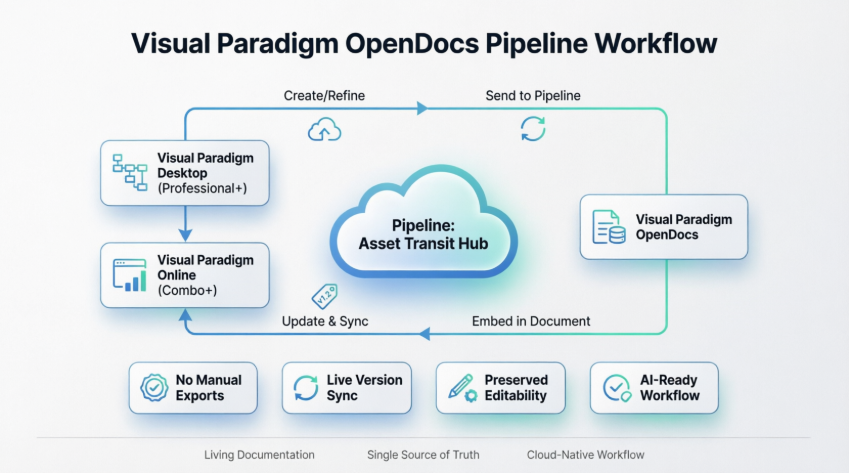
The OpenDocs Pipeline is a centralized cloud-based “Asset Transit Hub” that bridges the gap between Visual Paradigm’s modeling environments (Desktop and Online) and its documentation platform (OpenDocs). It allows you to transform technical diagrams into “living” parts of your documentation by eliminating manual export/import cycles.
What is Visual Paradigm OpenDocs?
OpenDocs is a premier knowledge and document management platform built for modern teams. Unlike conventional tools, OpenDocs integrates directly with a robust diagramming engine. This means you can insert diagrams into your pages and re-edit them later without leaving the document. By supporting exports from both Visual Paradigm Desktop and Online, OpenDocs becomes the central hub for all your professional modeling and documentation needs.
Understanding the Pipeline Architecture
The Pipeline acts as your personal “Asset Transit Hub.” It is a centralized repository that stores your diagrams and graphics (which we call “artifacts”) so they can be easily shared between different applications in the Visual Paradigm ecosystem. When you “Send to Pipeline” from any Visual Paradigm editor, you are placing that artifact into a space where OpenDocs can instantly see it and use it as an input for your documents.
🔄 Workflow Overview
The pipeline functions as a single source of truth for your modeling artifacts:
graph LR
    A[Create/Refine Diagram] --> B[Send to Pipeline]
    B --> C[Embed in OpenDocs]
    C --> D[Update & Sync]
    D --> A
-
Create/Refine: Build or edit diagrams in Visual Paradigm Desktop (Professional Edition+) or Visual Paradigm Online (Combo Edition+).
-
Send to Pipeline: Use the Export > Send to OpenDocs Pipeline feature within the editor to upload the diagram as an “artifact” to the cloud repository.
-
Embed in OpenDocs: Inside the OpenDocs editor, use the Insert > Pipeline menu to select and place the artifact directly into your document.
-
Synchronize: When the source model is updated in the desktop or online editor, re-sending it to the pipeline creates a new revision. OpenDocs users are notified of the update and can “swap” to the latest version with one click.
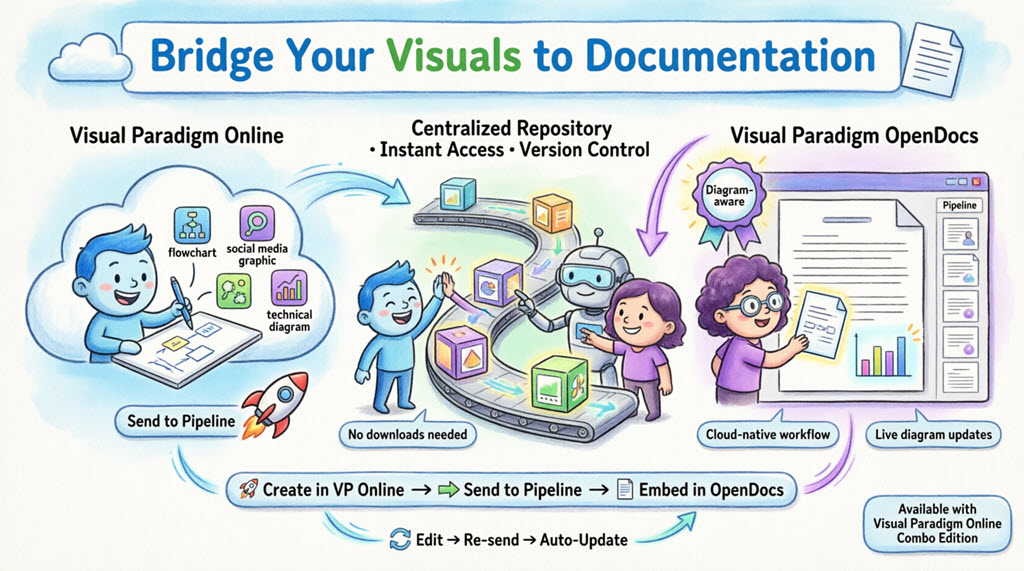
🌐 Sending from Visual Paradigm Online
Note: This feature is available to users with a Visual Paradigm Online Combo Edition subscription.
Moving your work from the cloud editor to your document is simple and intuitive:
Step 1: Open Your Diagram
Open your diagram or graphic in Visual Paradigm Online.
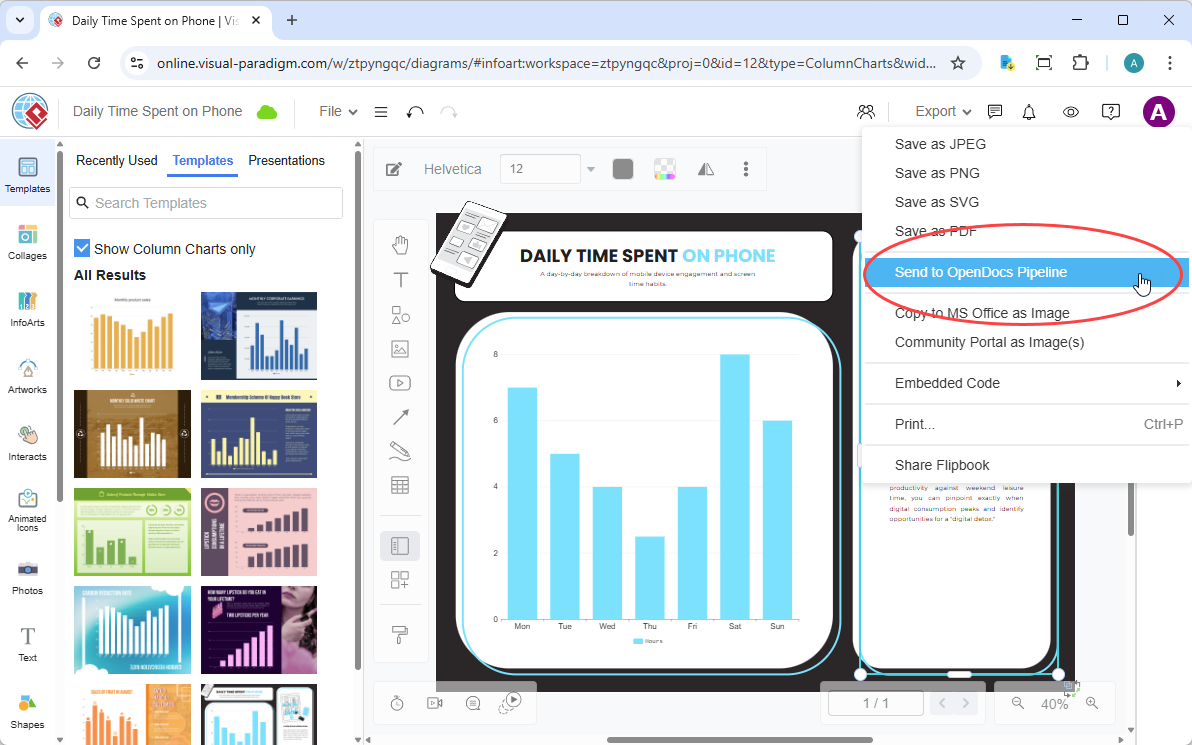
Step 2: Export to Pipeline
In the top menu, select Export > Send to OpenDocs Pipeline.
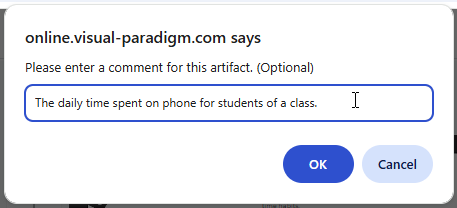
Step 3: Add Optional Context
(Optional) Add a comment to describe the artifact. This makes it easier to find later in the Pipeline pane.
Step 4: Confirm Export
Confirm the export. Your visual is now securely stored in the Pipeline and ready for embedding.
💻 Sending from Visual Paradigm Desktop
Note: This integration is available to users of Visual Paradigm Professional Edition and above.
Whether you created your diagram manually or used the AI generation tool, exporting it to your documentation is simple:
Step 1: Open Your Diagram
In Visual Paradigm Desktop, open the diagram you wish to send.
Step 2: Right-Click Export
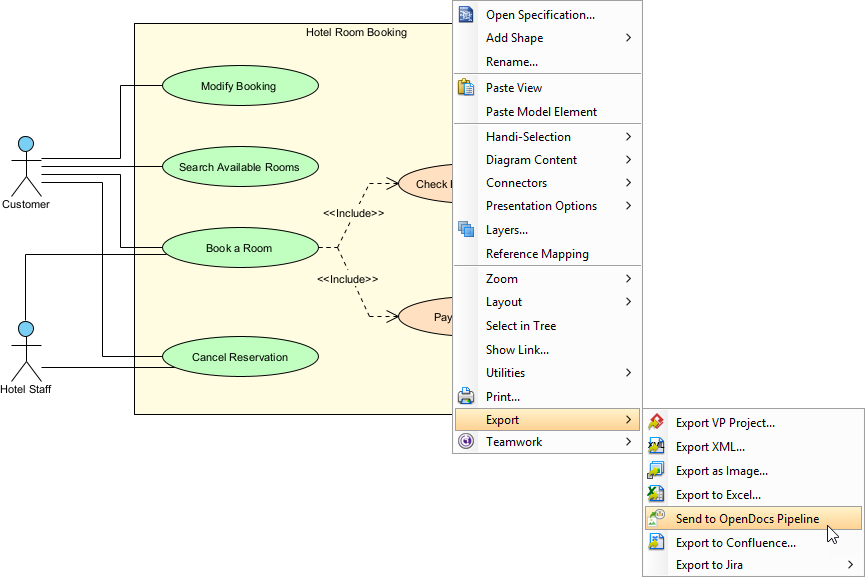
Right-click on the diagram and select Export > Send to OpenDocs Pipeline.
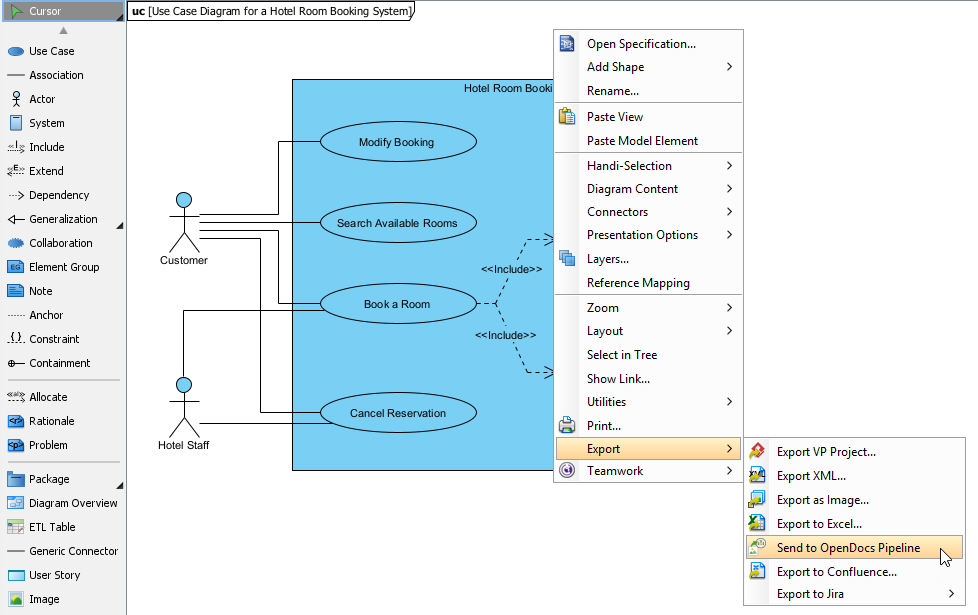
Step 3: Save Project
When prompted, save your project by clicking OK.
Step 4: Add Metadata (Optional)
(Optional) Enter a comment. This will be visible in the Pipeline pane within OpenDocs to help you identify the version or purpose of the artifact.
Step 5: Confirm Cloud Export
Confirm the export to output your diagram to the cloud repository.
📄 Embedding Artifacts in OpenDocs
Once your diagram is in the Pipeline, you can place it anywhere in your knowledge base:
Step 1: Enter Edit Mode
Open any document page in OpenDocs and click Edit.

Step 2: Position Cursor
Click on the page where you want to insert the diagram.
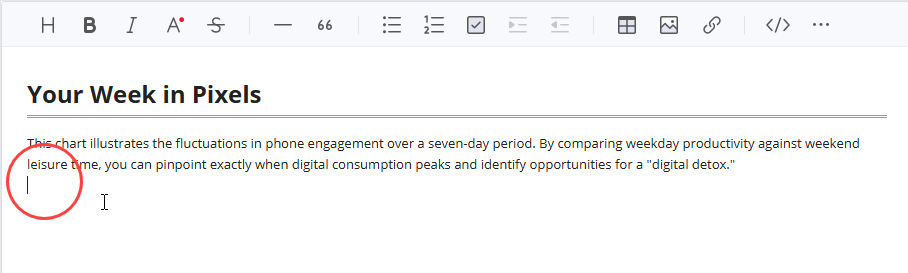
Step 3: Access Insert Menu
On the toolbar, click Insert.
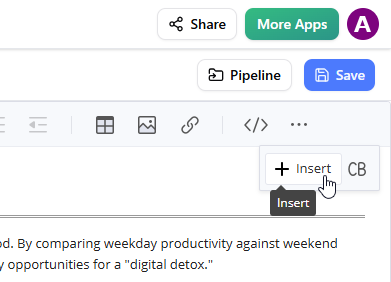
Step 4: Select from Pipeline
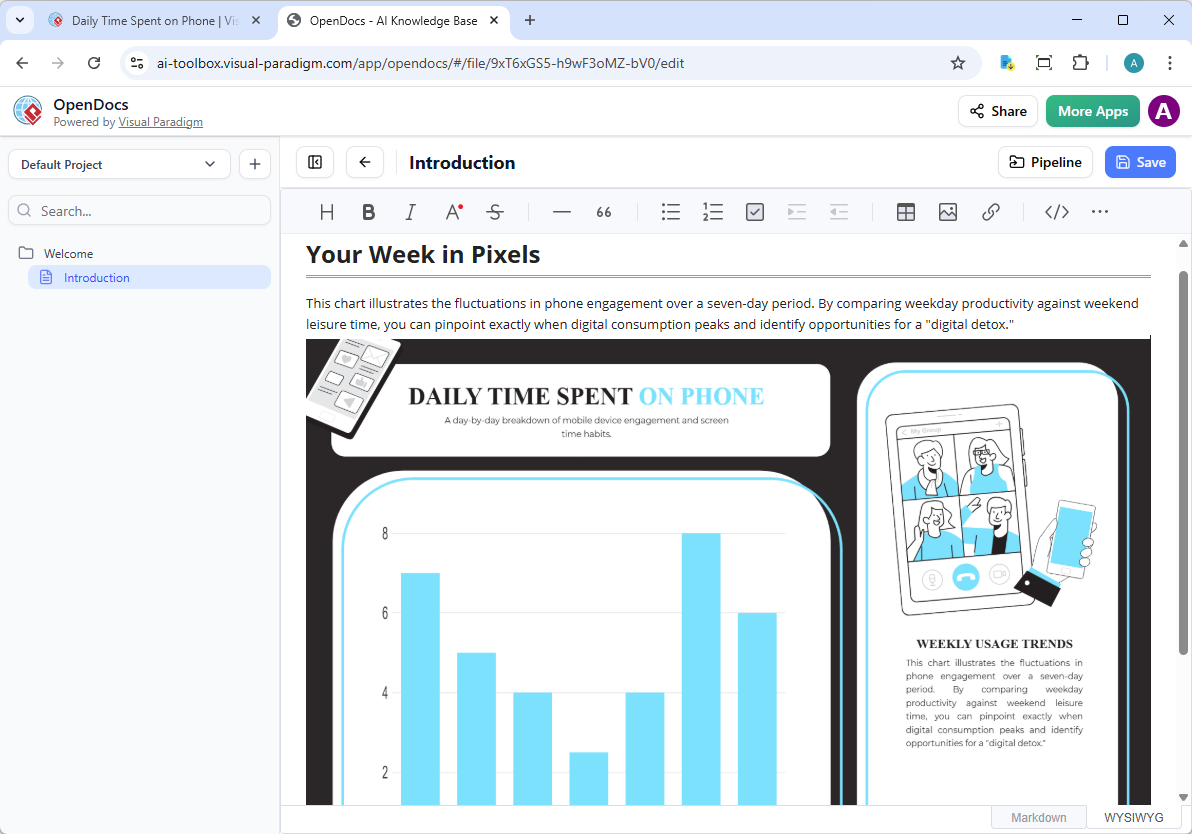
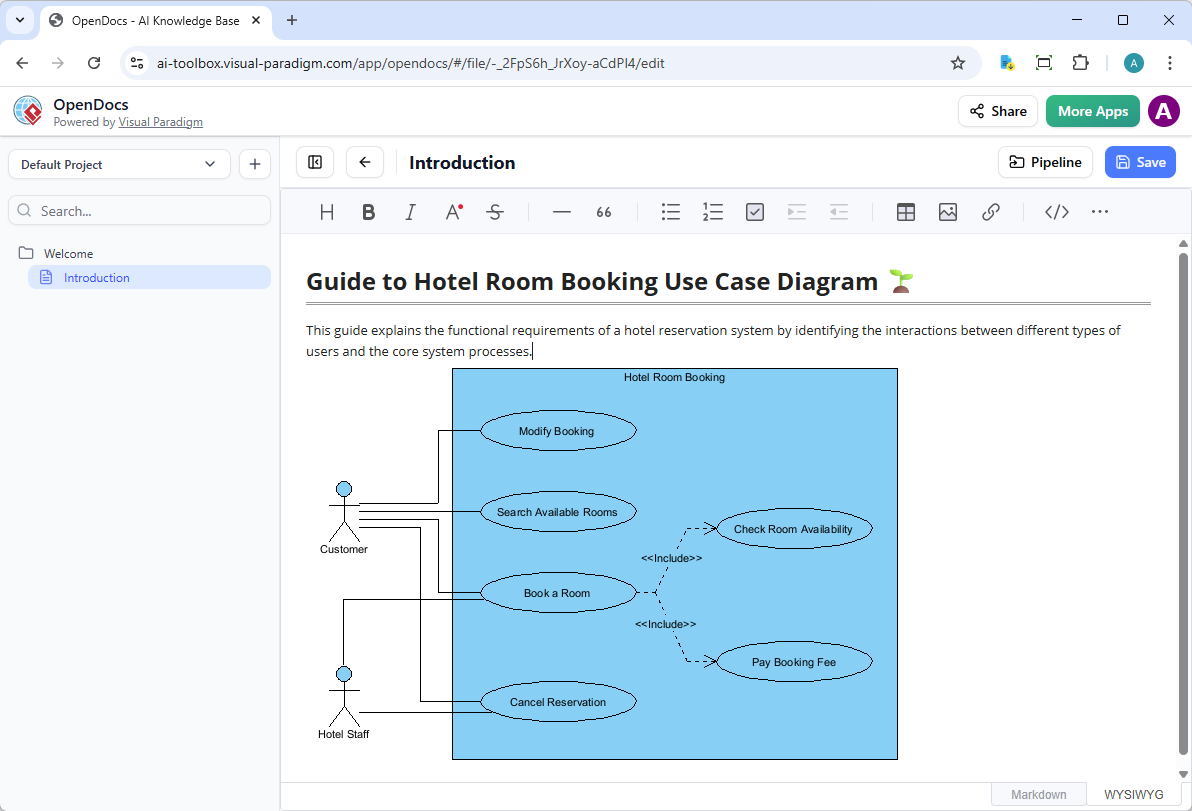
In the Insert window, select Pipeline from the left-hand sidebar. Your sent diagrams will appear here.
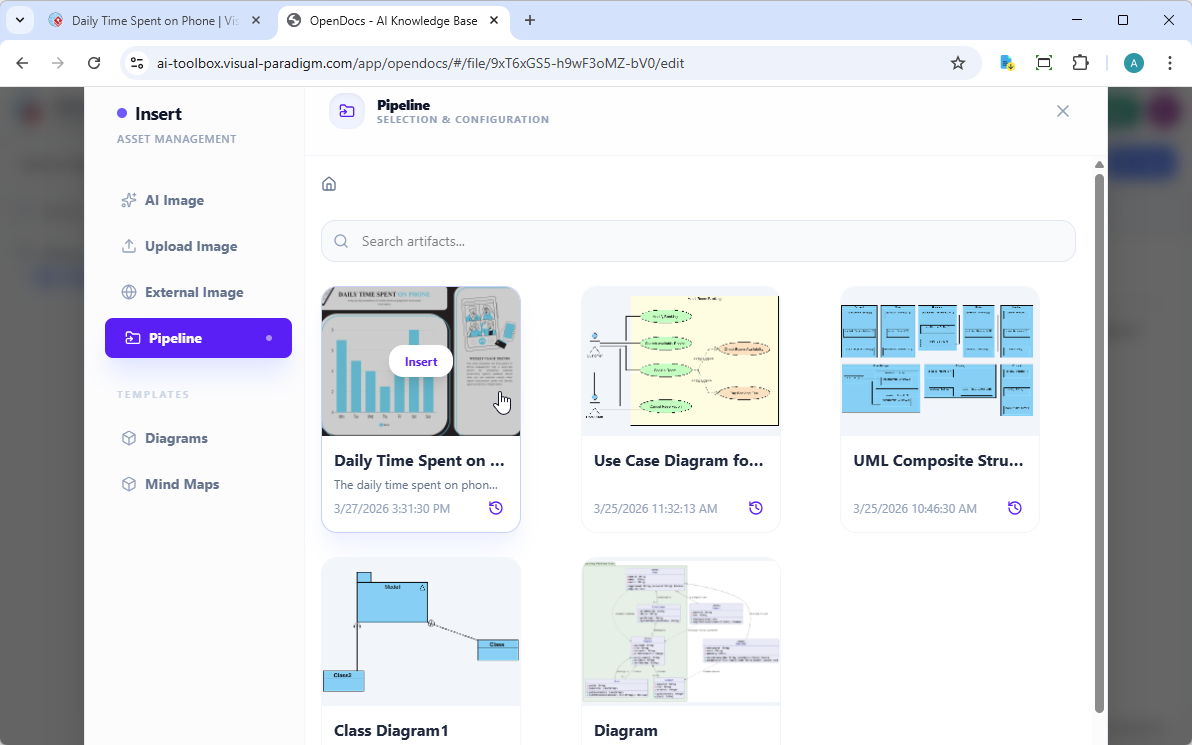
Step 5: Insert Diagram
Click on the diagram to insert the image directly at your cursor position.
🔄 Keeping Documentation in Sync
One of the most powerful aspects of this integration is the ability to update your documentation as your models evolve.
For Visual Paradigm Online Users
1. Open the Source Diagram
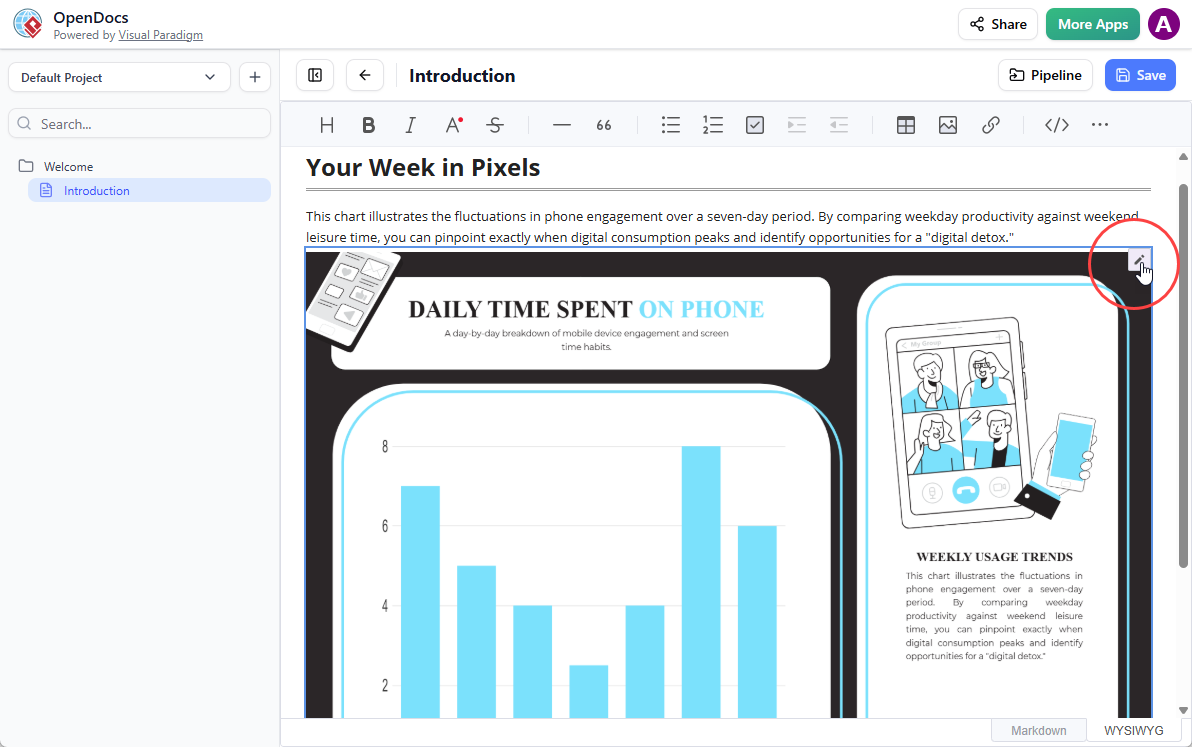
In OpenDocs, click the Edit icon at the top right of the diagram image to open the Edit Diagram window.
2. Edit and Re-send
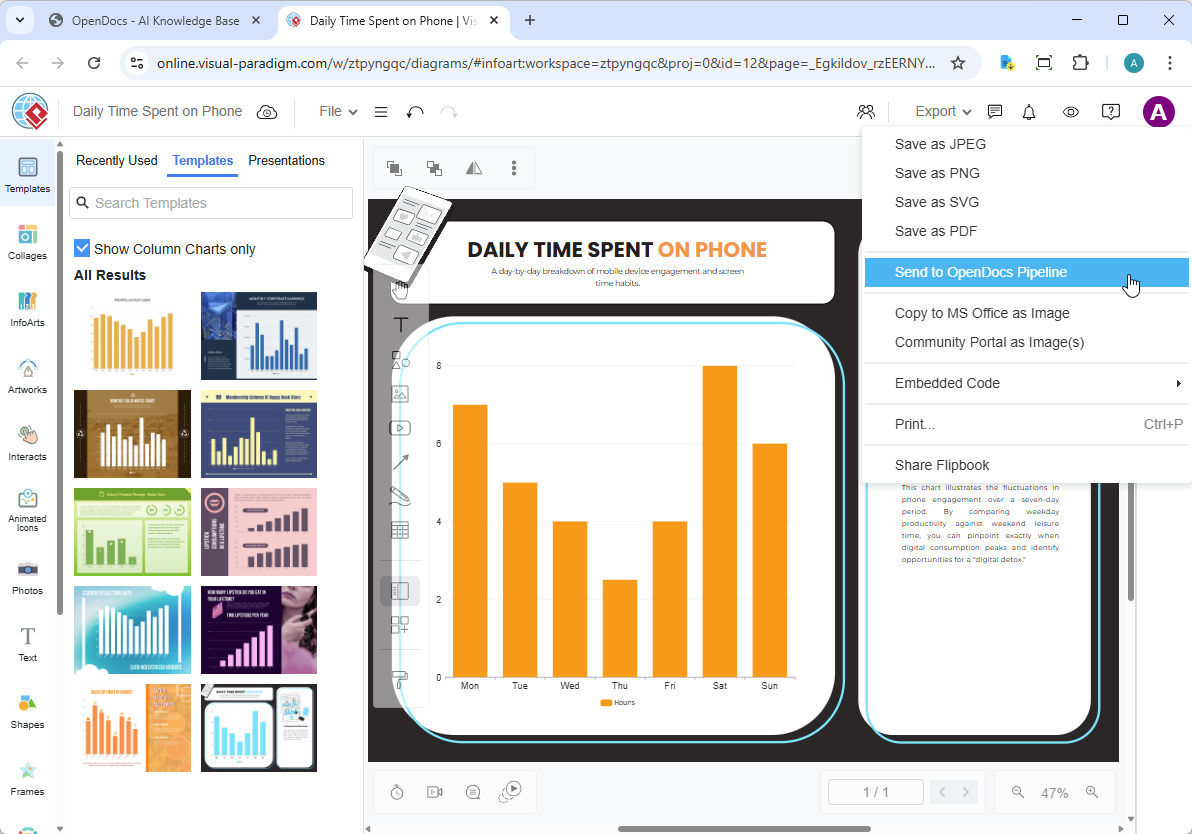
Modify your diagram in Visual Paradigm Online. Once finished, select Export > Send to OpenDocs Pipeline from the top menu again.
3. Swap to Latest Revision
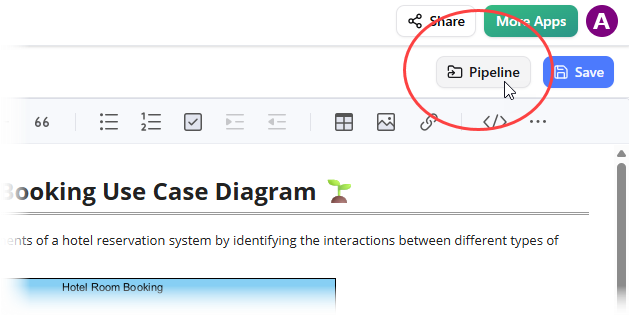
Back in the OpenDocs editor, click Pipeline at the top right.
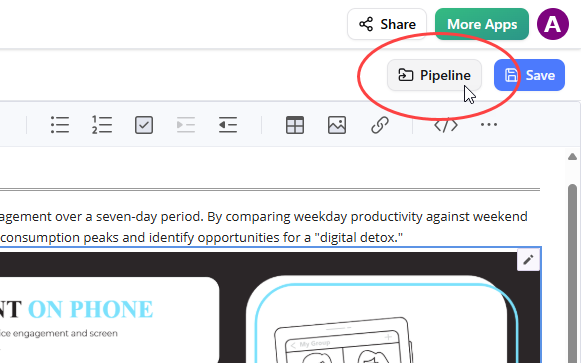
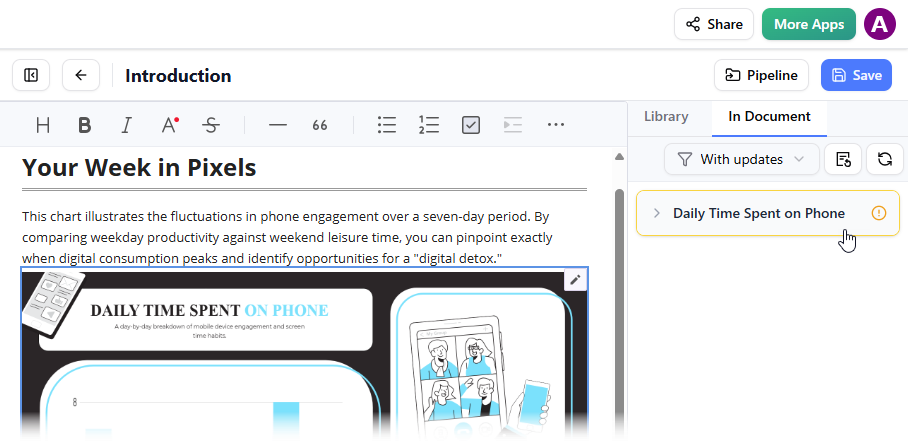
Open the In Document tab. The filter “With updates” is active and the pane is now listing the artifacts modified. Click on the visual just modified.
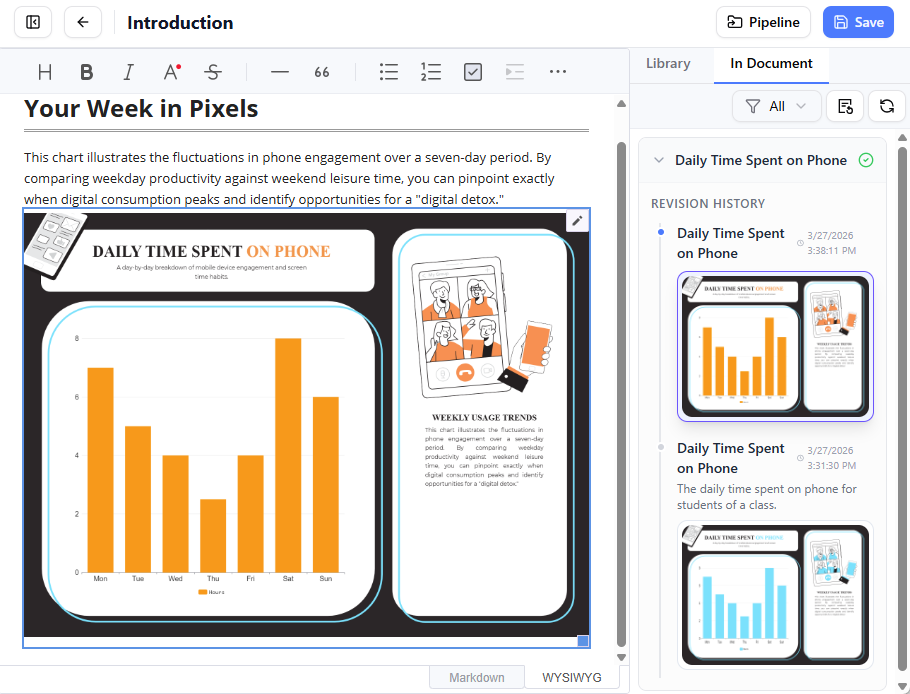
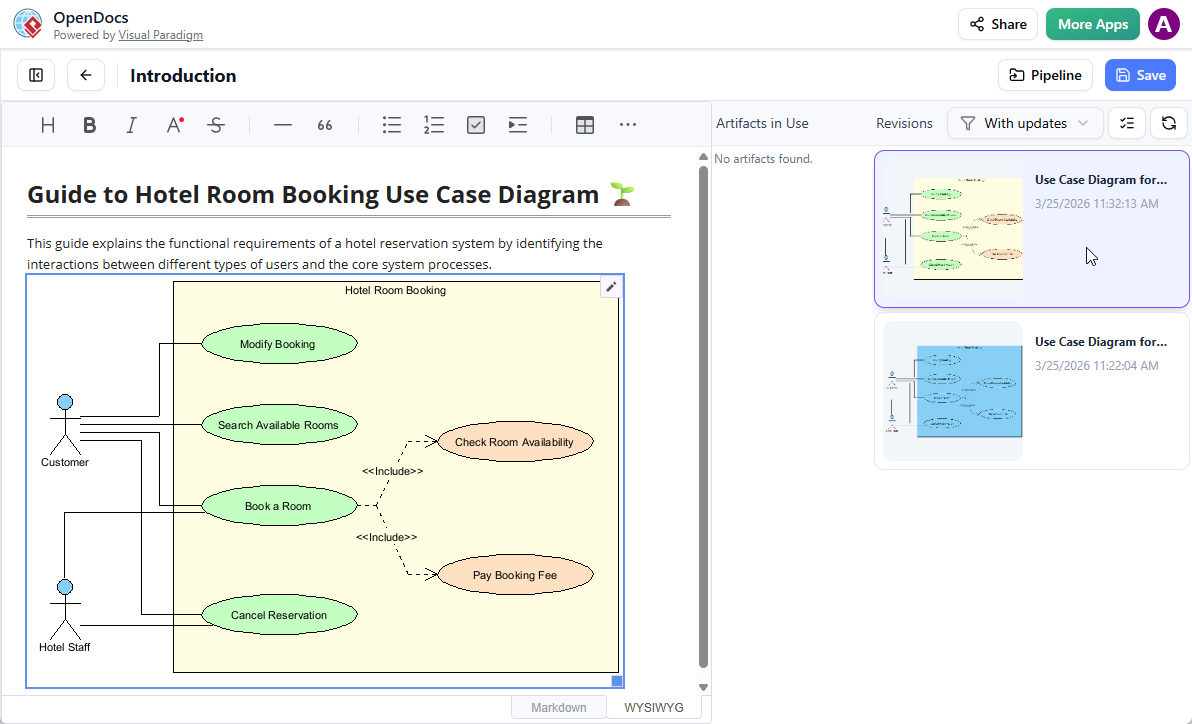
You can see the available revisions for the selected visual. Click on the latest revision to instantly swap the old diagram for the updated version. Or you can click on Update to latest revision directly.
For Visual Paradigm Desktop Users
1. Open the Source Diagram
In OpenDocs, click the Edit icon at the top right of the diagram image to open the Edit Diagram window.
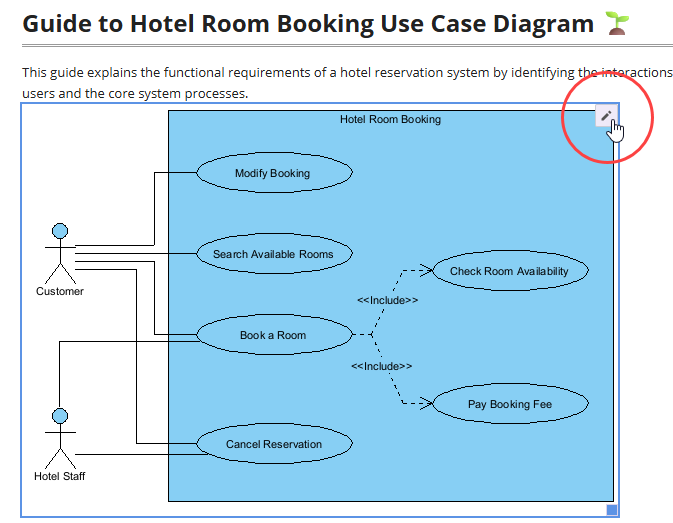
Copy the diagram link provided. In Visual Paradigm Desktop, go to Project > Open, paste the link, and the software will open the source model for you.
2. Edit and Re-send
Modify your diagram in Visual Paradigm Desktop. Once finished, right-click the diagram and select Export > Send to OpenDocs Pipeline again. You can also simply commit your changes to VP Online, which automatically creates a new revision of the artifact.
3. Swap to Latest Revision
Back in the OpenDocs editor, click Pipeline at the top right.
You will see the artifacts currently used on that page. Select the diagram to see a list of revisions. Simply click on the latest revision to instantly swap the old diagram for the updated version.
✨ Key Benefits
| Benefit | Description |
|---|---|
| 🚫 Eliminates Static Exports | No need to manually download, upload, or replace image files whenever a design changes. |
| ✏️ Preserves Editability | Diagrams embedded via the pipeline maintain a link to their source model, allowing you to jump back into the modeling tool directly from the document for edits. |
| 📦 Automated Versioning | The pipeline tracks all sent revisions, enabling you to manage different versions of a diagram within the same document. |
| 🤖 Unified AI Workflow | Quickly prototype with Visual Paradigm Desktop AI, refine the result, and immediately push it to your documentation hub. |
| ☁️ Cloud-Native | Keep your entire workflow in the browser—no local file management required. |
| 👥 Team Collaboration | Multiple stakeholders can view, comment on, and update documentation with living diagrams. |
⚙️ Integration Requirements
| Component | Requirement |
|---|---|
| Visual Paradigm Desktop | Professional Edition or higher with active maintenance |
| Visual Paradigm Online | Combo Edition subscription or higher |
| Workspace ID | Both Desktop and Online versions must be linked to the same Visual Paradigm Online Workspace ID to share the pipeline |
| Internet Connection | Required for cloud synchronization and Pipeline access |
| Browser | Modern browser (Chrome, Firefox, Edge, Safari) for OpenDocs access |
💡 Pro Tip: Link your Desktop license to your Online workspace by visiting Visual Paradigm KnowHow for seamless Pipeline access.
👥 Third-Party End User Review
Preview and comments from independent users who tested the OpenDocs Pipeline feature
🧪 Testing Environment
-
User Role: Technical Documentation Lead, Mid-size SaaS Company
-
Team Size: 12-person product/engineering team
-
Use Case: Maintaining living architecture documentation for microservices platform
-
Tools Used: Visual Paradigm Desktop Professional + OpenDocs + VP Online Combo
⭐ Overall Rating: 4.7/5
“This integration fundamentally changed how our team handles technical documentation. What used to take 30 minutes of export/upload/replace cycles now happens in under 60 seconds.”
✅ What Worked Well
🎯 Seamless Workflow Integration
“The ‘Send to Pipeline’ option feels native to both Desktop and Online interfaces. No context switching, no confusing menus—just export and embed. Our junior engineers adopted it within a single onboarding session.”
🔄 Real-Time Synchronization
“The revision tracking is brilliant. When our lead architect updated a sequence diagram, the entire team saw the ‘Update Available’ badge in OpenDocs. One click to swap versions—no more ‘which diagram is current?’ Slack threads.”
🖼️ Editability Preservation
“Being able to click the edit icon on an embedded diagram and jump straight back into Visual Paradigm Desktop saved us hours per week. The link between document and source model stays intact.”
🤖 AI-to-Docs Pipeline
“We prototype system designs with the AI diagram generator in Desktop, refine them manually, then push straight to OpenDocs for stakeholder review. The end-to-end flow feels like magic.”
⚠️ Areas for Improvement
🔐 Permission Granularity
“Would love more control over who can update Pipeline artifacts. Currently, anyone with workspace access can overwrite diagrams. Role-based permissions would help enterprise teams.”
📱 Mobile Experience
“OpenDocs works well on tablets for viewing, but the Pipeline insertion workflow is desktop-optimized. Mobile editing support would be valuable for remote teams.”
📊 Bulk Operations
“When migrating legacy documentation, we needed to send 50+ diagrams to Pipeline. A batch export feature would save significant time.”
🔍 Search & Filtering
“The Pipeline pane shows recent artifacts well, but advanced filtering (by date, creator, diagram type) would help teams managing hundreds of assets.”
💬 User Quotes
“Before Pipeline, our architecture docs were always slightly outdated. Now they’re living documents that evolve with the system. Game-changer for audit readiness.”
— Sarah K., Enterprise Architect
“The comment field when sending to Pipeline is underrated. We use it to note ‘v2.1 – added auth flow’ so reviewers instantly understand context.”
— Marcus T., DevOps Lead
“As a contractor, I appreciate that I don’t need to request file exports from the core team. If I have Pipeline access, I can embed and update diagrams independently.”
— Priya L., External Consultant
🏁 Final Verdict
| Category | Score | Notes |
|---|---|---|
| Ease of Use | 5/5 | Intuitive export/embed flow; minimal learning curve |
| Reliability | 4.5/5 | Cloud sync is robust; occasional 2-3 sec delay on large diagrams |
| Value for Teams | 5/5 | Eliminates documentation drift; accelerates review cycles |
| Enterprise Readiness | 4/5 | Needs enhanced permissions and audit logging |
| Innovation | 5/5 | True “living documentation” paradigm; AI integration is forward-thinking |
Recommendation: Highly recommended for teams maintaining technical documentation alongside active development. The time saved on diagram management alone justifies the Combo/Professional edition upgrade for most organizations.
📋 Summary
The OpenDocs Pipeline represents a paradigm shift in how teams manage visual documentation. By serving as a centralized cloud-based “Asset Transit Hub,” it eliminates the traditional friction between diagram creation and knowledge management, enabling a seamless, cloud-native workflow from concept to published documentation.
🔑 Core Takeaways
| Area | Key Insight |
|---|---|
| Workflow | Create → Send to Pipeline → Embed in OpenDocs → Update & Sync = Living documentation |
| Accessibility | Available to Visual Paradigm Desktop Professional Edition+ and Online Combo Edition+ users |
| Synchronization | Revised diagrams create new Pipeline revisions; OpenDocs users swap to latest versions with one click |
| Editability | Embedded diagrams maintain links to source models, enabling direct re-editing from within documents |
| Collaboration | Teams work from a single source of truth, reducing documentation drift and review cycles |
💡 Why This Matters
-
Save Time: Replace 30-minute export/upload cycles with 60-second Pipeline transfers
-
Reduce Errors: Eliminate “which diagram is current?” confusion through automated versioning
-
Enhance Collaboration: Stakeholders view and interact with up-to-date visuals without specialized tools
-
Future-Proof Docs: AI-generated prototypes, refined models, and published documentation exist on one continuous workflow
🎯 Who Should Use This
✅ Technical documentation teams maintaining architecture or process diagrams
✅ Engineering teams practicing living documentation or docs-as-code
✅ Product managers aligning stakeholders with visual specifications
✅ Consultants and contractors needing seamless access to client documentation
✅ Organizations adopting AI-assisted modeling and knowledge management
🚀 Getting Started
-
Verify your edition meets requirements (Desktop Professional+ or Online Combo+)
-
Link Desktop and Online to the same Workspace ID
-
Create or open a diagram in your preferred editor
-
Use Export > Send to OpenDocs Pipeline to publish your artifact
-
Embed and manage visuals directly within OpenDocs
Bottom Line: The OpenDocs Pipeline isn’t just a feature—it’s a workflow transformation. By treating diagrams as living, versioned assets rather than static exports, teams can build documentation that stays accurate, collaborative, and valuable throughout the product lifecycle.
- 📚 References
- Exporting diagrams from Visual Paradigm Desktop to OpenDocs: Official Visual Paradigm release guide detailing the Desktop-to-OpenDocs Pipeline integration workflow, including AI diagram generation and revision management.
- Complete Guide: Sending Visual Paradigm Creations to OpenDocs via Pipeline: Third-party tutorial covering end-to-end setup, troubleshooting tips, and best practices for Pipeline adoption across team workflows.
- Mastering the Pipeline in Visual Paradigm OpenDocs: A Complete Guide to Streamlined Knowledge Management: In-depth exploration of Pipeline architecture, artifact versioning strategies, and integration patterns for enterprise documentation systems.
- Mastering the Pipeline in Visual Paradigm OpenDocs: A Complete Guide to Streamlined Knowledge Management: Comprehensive resource on leveraging Pipeline for collaborative knowledge management, including permission models and audit workflows.
- Sync AI Diagram to OpenDocs Pipeline Guide: Official documentation for synchronizing AI-generated diagrams from Visual Paradigm Desktop to OpenDocs with automated revision tracking.
- Sync AI Diagram to OpenDocs Pipeline Guide: Step-by-step instructions for connecting AI modeling outputs to living documentation via the Pipeline transit hub.
- Exporting diagrams from Visual Paradigm Online to OpenDocs: Official release notes and user guide for the VP Online to OpenDocs Pipeline integration, including Combo Edition requirements.
- Visual Paradigm Pipeline Tutorial Video: Official video walkthrough demonstrating the complete workflow from diagram creation to OpenDocs embedding and revision updates.
- Exporting diagrams from Visual Paradigm Online to OpenDocs: Technical documentation covering cloud-based diagram export, comment metadata, and Pipeline artifact management.
- Sync AI Diagram to OpenDocs Pipeline Guide: Reference guide for maintaining synchronized documentation when source models evolve, including conflict resolution strategies.
- Visual Paradigm OpenDocs: The Complete Guide to AI-Powered Knowledge Management: Holistic overview of OpenDocs capabilities, Pipeline integration, and AI-assisted documentation workflows for modern engineering teams.
- Mastering the Pipeline in Visual Paradigm OpenDocs: A Complete Guide to Streamlined Knowledge Management: Advanced guide covering Pipeline optimization, bulk operations, and enterprise deployment patterns.
- Visual Paradigm Pipeline Tutorial Video (Timestamped): Video tutorial with chapter markers highlighting key Pipeline features including artifact insertion, revision swapping, and cross-tool synchronization.
- Visual Paradigm OpenDocs: The Complete Guide to AI-Powered Knowledge Management and Diagram Generation: Independent review and implementation guide focusing on AI diagram generation, Pipeline integration, and documentation automation.
- Exporting diagrams from Visual Paradigm Online to OpenDocs: Official feature documentation detailing cloud workflow benefits, edition requirements, and step-by-step embedding instructions.
- Link Desktop to Online Workspace: Technical knowledge base article explaining how to connect Visual Paradigm Desktop licenses to Online workspaces for unified Pipeline access.
- Complete Guide: Sending Visual Paradigm Creations to OpenDocs via Pipeline: Practical implementation guide with screenshots, common pitfalls, and optimization tips for teams adopting the Pipeline workflow.
-
ℹ️ Last Updated: April 2026
🔄 Feature Status: Generally Available
📧 Support: For setup assistance, contact Visual Paradigm Support or visit the Visual Paradigm KnowHow knowledge base. - This guide is based on official Visual Paradigm release documentation and independent third-party testing. Feature availability and requirements are subject to change; always consult official sources for the latest information
Related posts:
 📘 The Ultimate Guide: Sharing Visual Paradigm Flipbooks & Digital Bookshelves to OpenDocs
 My 30-Day Journey Mastering Visual Paradigm OpenDocs and the Pipeline Ecosystem
 From Prompt to Professional Model: My Hands-On Review of Visual Paradigm’s AI Activity Diagram Import Feature
 From Static Docs to Interactive Libraries: A Hands-On Review of Visual Paradigm’s OpenDocs Flipbook Integration