


🎉 Introduction: A New Era of Interactive Documentation
We are excited to announce a groundbreaking new workflow that brings your digital publications to life within your documentation ecosystem. You can now share flipbooks created in Visual Paradigm Online directly to OpenDocs, making your manuals, reports, and portfolios more interactive, engaging, and accessible than ever before.
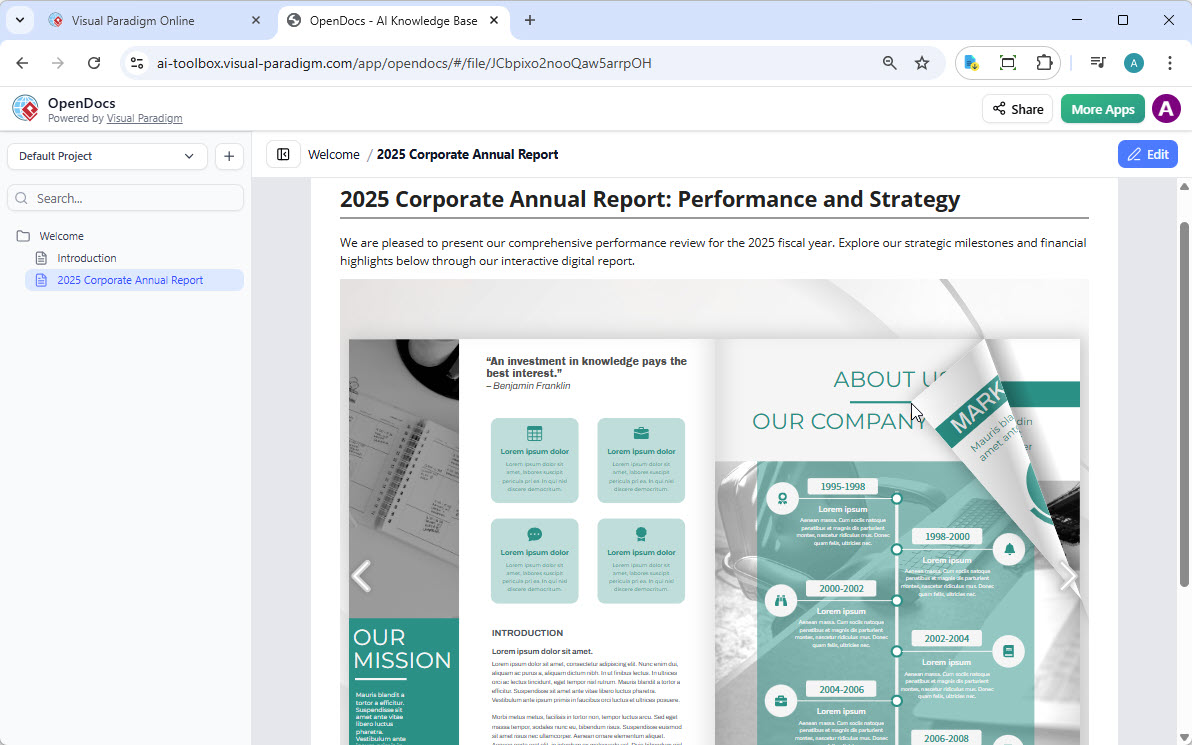
Whether you are using our flipbook tool to generate professional content or fine-tuning a custom layout in our flipbook maker, this integration ensures your audience can access your work exactly where they need it—without leaving your documentation environment.
📚 What Is Fliplify?
Fliplify is an interactive digital publishing platform and flipbook maker integrated into the Visual Paradigm Online cloud suite. It transforms static documents—like PDFs, Word files, and PowerPoint presentations—into dynamic HTML5 flipbooks that feature realistic 3D page-turning animations, bringing your content to life with professional-grade interactivity.
✨ Key Features of Visual Paradigm Flipbooks
Our flipbook software is designed to transform static documents into dynamic, engaging experiences. With this powerful integration, you can:
🔁 Convert & Create
-
Instantly transform PDFs, Word docs, and PowerPoint slides into flipbooks
-
Design flipbooks from scratch using our intuitive drag-and-drop editor
-
Support for multiple file formats ensures flexibility for any content type
🤖 AI-Powered Generation
-
Use our AI assistant to generate full book outlines automatically
-
Let AI help write content sections and suggest improvements
-
Create matching illustrations in various art styles with AI image generation
🎬 Interactive Elements
-
Embed videos, audio clips, and animated GIFs directly into pages
-
Add clickable links, buttons, and navigation elements
-
Include realistic page-flipping sound effects for immersive reading
-
Support for Lottie animations and 3D character integration
🎨 Professional Branding
-
Customize covers, themes, and backgrounds to match your corporate identity
-
Access an extensive library of professionally designed templates
-
Apply consistent branding across all your digital publications
📱 Mobile-First Reading Experience
-
Every flipbook is fully responsive by design
-
Optimized reading experience on desktops, tablets, and smartphones
-
Reader mode for enhanced mobile accessibility
-
OCR-powered text search for easy content discovery
🔍 Analytics & Accessibility
-
Built-in infrastructure for tracking reader engagement metrics
-
SEO optimization tools to improve content discoverability
-
Password protection options for sensitive or private content
-
Accessibility features compliant with modern web standards
🔄 How to Share Your Flipbook to OpenDocs
Moving your content from Visual Paradigm Online to the OpenDocs pipeline is simple and streamlined. Just follow these step-by-step instructions:
Step 1: Access Your Workspace
Open your workspace page in Visual Paradigm Online and ensure you’re logged into your account.
Step 2: Navigate to Flipbooks Library
Select Flipbooks from the left-hand menu to view your library of created publications.
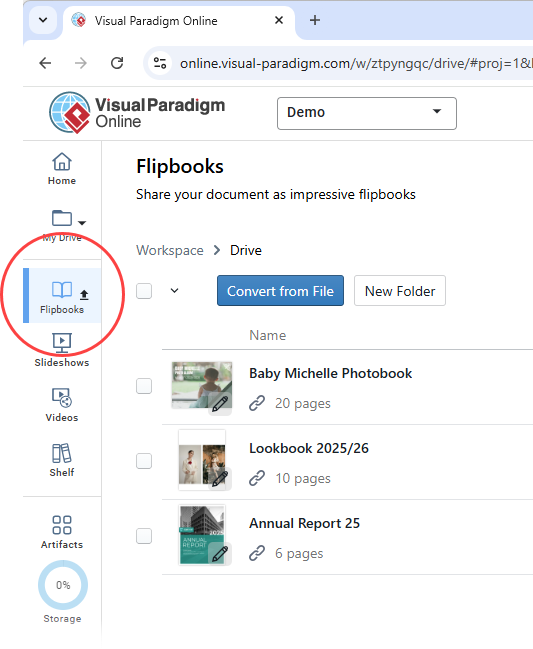
Step 3: Locate Your Flipbook
Browse or search to locate the flipbook you wish to share with OpenDocs.
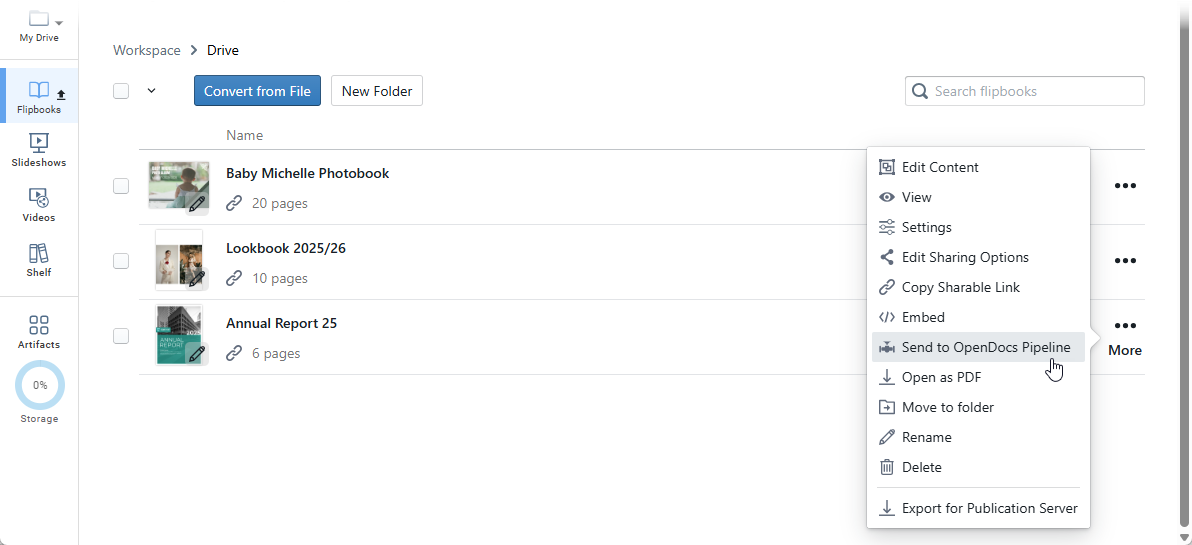
Step 4: Initiate the Share Process
Click More… on the right side of your chosen flipbook entry, then select Send to OpenDocs Pipeline.
Step 5: Add Context (Optional)
(Optional) Enter a comment regarding this share to help your team understand the context, then click OK to proceed with the transfer.
✅ Your flipbook is now available in the OpenDocs pipeline!
📄 Embedding Your Flipbook in OpenDocs
Once your flipbook is successfully transferred to the pipeline, follow these steps to place it directly into your OpenDocs document:
Step 1: Navigate to Your Target Page
Go to the specific page in OpenDocs where you want to embed the interactive flipbook.
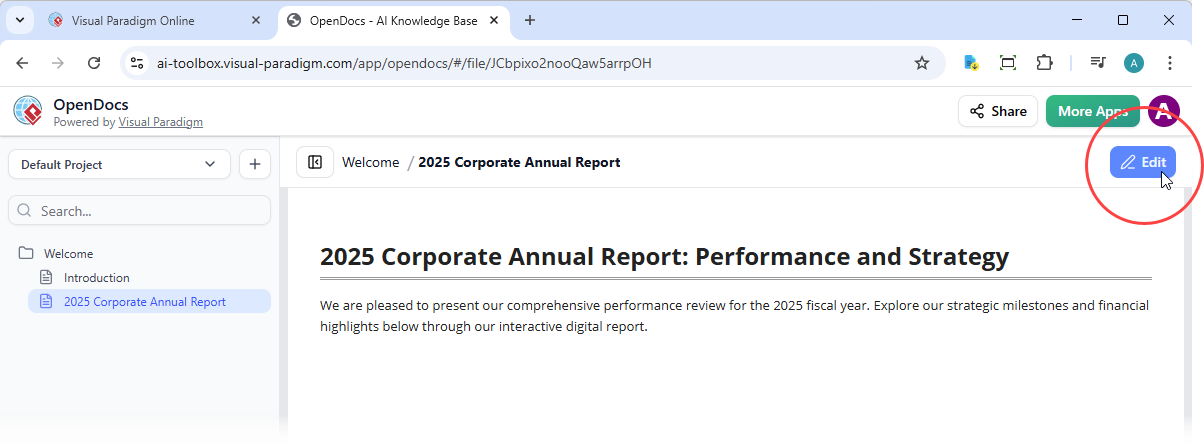
Step 2: Enter Edit Mode
Click Edit at the top right of the screen to enable content editing capabilities.
Step 3: Position Your Cursor
Place your cursor exactly where you want the flipbook to appear within your document content.
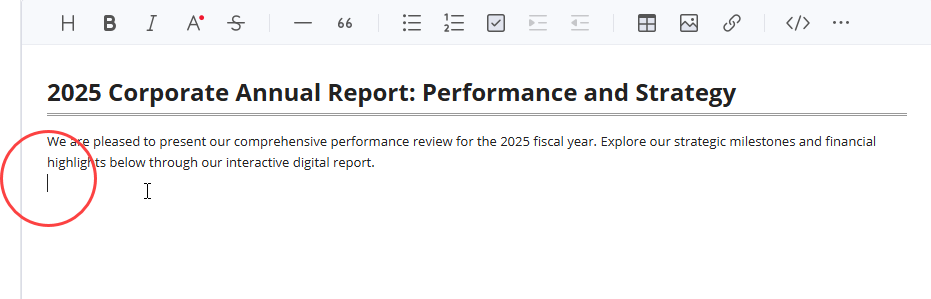
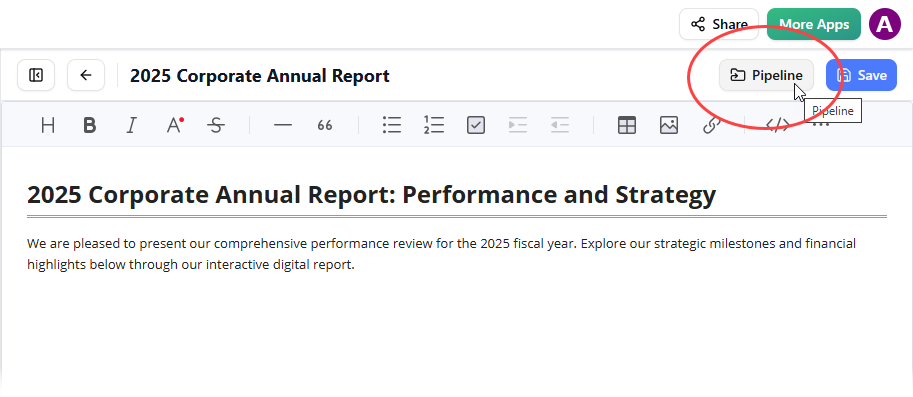
Step 4: Access the Pipeline Library
Click the Pipeline button located at the top right of the editor interface.
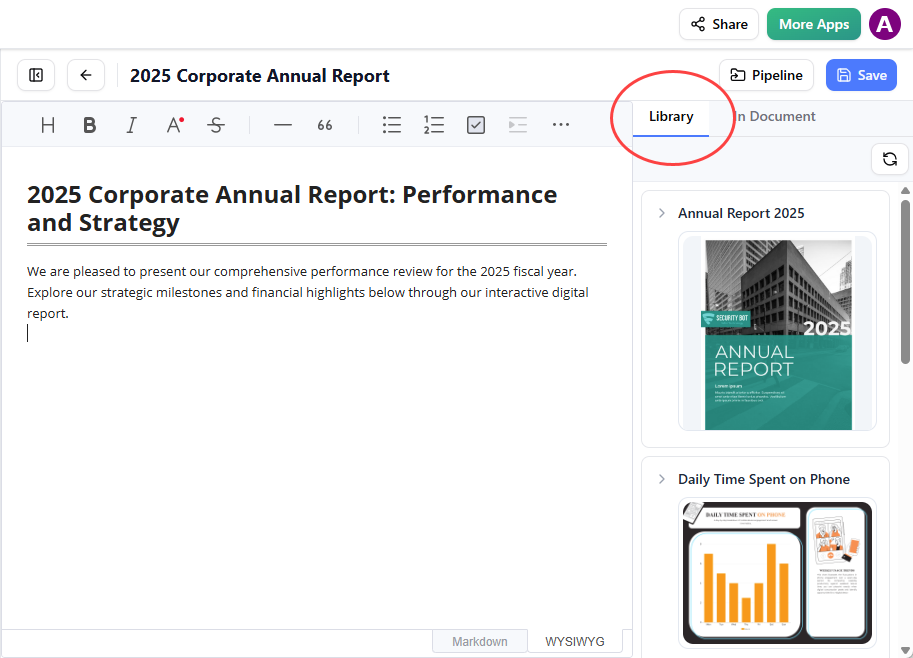
Step 5: Open the Library Tab
Navigate to the Library tab within the Pipeline panel; you will see the flipbook you previously sent from VP Online.
Step 6: Insert Your Flipbook
Click on the flipbook thumbnail to insert it directly into your document at the cursor position.
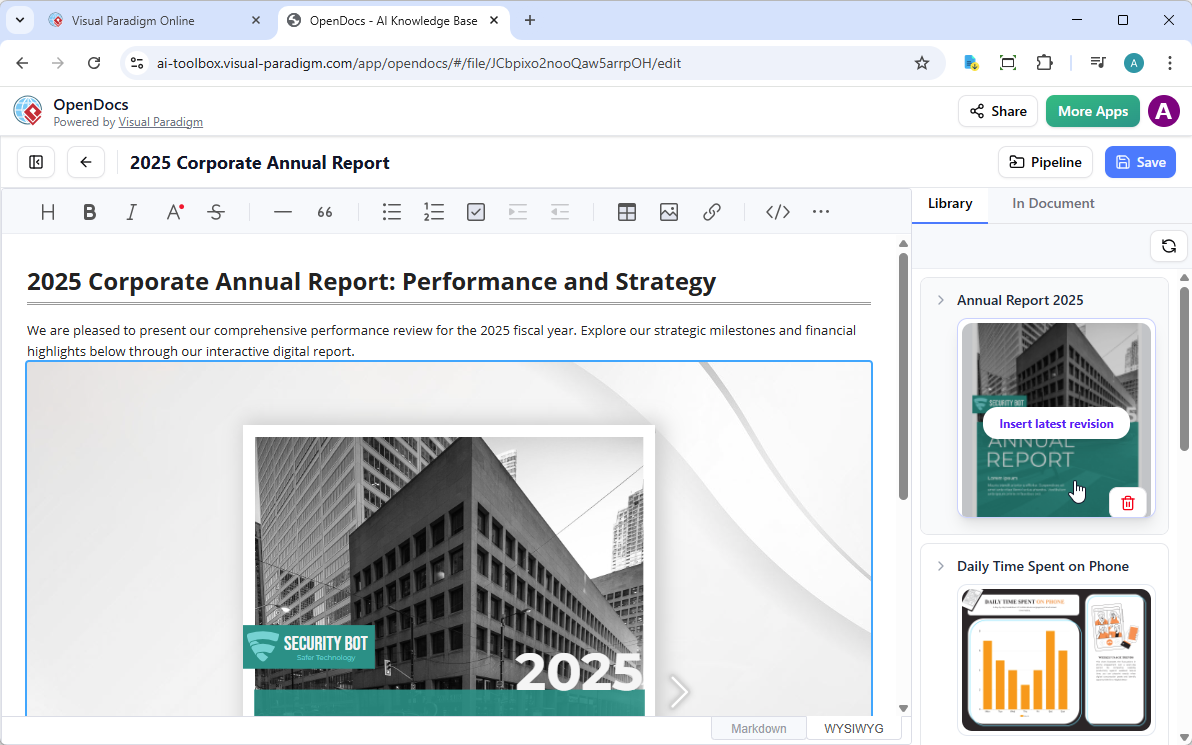
💡 Pro Tip: If the flipbook is added to the end of the page, select it and press Enter to create a new line and adjust the positioning for optimal layout.
⚙️ Important Usage Notes
-
Edit Mode Behavior: In Edit mode, the flipbook remains static to preserve document structure. To interact with the flipbook (flip pages, click links, play media), simply save your changes and exit Edit mode.
-
Sharing Your Content: Once live, you can share the page or the entire space using the Share button in the top bar, enabling collaborative access with your team or external stakeholders.
-
Responsive Design: All embedded flipbooks maintain their responsive design, ensuring perfect rendering across all device types and screen sizes.
-
Version Control: When you update a flipbook in Visual Paradigm Online, you can re-send it to OpenDocs to keep your documentation current.
🌐 The Visual Paradigm Ecosystem Advantage
Fliplify is part of a larger interconnected environment that simplifies the creation, management, and distribution of digital assets:
🔗 Visual Paradigm Online Integration
As a core component of the Visual Paradigm suite, users can leverage broader graphic design assets, charts, diagrams, and modeling tools directly within their flipbook projects for cohesive, professional outputs.
🏠 Flexible Hosting Options
-
Cloud Hosting: Publish instantly on Fliplify’s secure, scalable cloud infrastructure
-
Self-Hosting: Deploy flipbooks on your own servers for complete branding control and data sovereignty
📤 Universal Sharing Capabilities
-
Distribute content via direct URLs, QR codes, or social media platforms
-
Embed flipbooks directly into websites, blogs, or learning management systems
-
Generate shareable links with customizable access permissions
📱 Cross-Device Compatibility
Publications are built with responsive HTML5 technology, ensuring seamless functionality across:
-
Desktop computers (Windows, macOS, Linux)
-
Tablets (iPad, Android tablets)
-
Smartphones (iOS, Android)
-
Interactive displays and kiosks
🚀 Ready to Transform Your Documentation?
Enhance your documents with the industry’s leading flipbook software and experience the power of truly integrated, interactive documentation.
🔗 Explore Visual Paradigm Online
📋 Quick Start Checklist
-
Create or upload content to Visual Paradigm Online
-
Convert documents to flipbook format using AI or manual tools
-
Customize design, branding, and interactive elements
-
Send flipbook to OpenDocs via the Pipeline feature
-
Embed flipbook into your OpenDocs page using the Library tab
-
Save, exit Edit mode, and test the interactive experience
-
Share your enhanced documentation with your audience
🔍 Troubleshooting & Support
| Issue | Solution |
|---|---|
| Flipbook not appearing in Pipeline Library | Refresh the Library tab or verify the send operation completed successfully |
| Flipbook displays as static in Edit mode | This is expected behavior; save and exit Edit mode to enable interactivity |
| Embedded flipbook sizing issues | Use the positioning tip: select flipbook and press Enter to adjust layout |
| Content not updating after re-send | Clear browser cache or perform a hard refresh (Ctrl+F5 / Cmd+Shift+R) |
| Permission errors when sharing | Verify your OpenDocs space permissions and user access levels |
For additional assistance, visit the Visual Paradigm Help Center or contact support through your account dashboard.
- 📚 Reference List
- Reference List for Learning Fliplify of Visual Paradigm Online: Comprehensive resource guide covering tutorials, documentation, and learning paths for mastering Fliplify’s flipbook creation tools within the Visual Paradigm ecosystem.
- Fliplify Official Website: The central hub for Fliplify, featuring product overview, feature highlights, pricing information, and direct access to the flipbook creation platform.
- Fliplify Review: The Complete Guide to Creating Interactive 3D Flipbooks Online: In-depth editorial review examining Fliplify’s capabilities, user experience, and comparative advantages in the digital publishing landscape.
- Amplify Education Programs Overview: Contextual reference highlighting educational technology applications, relevant for educators exploring flipbook tools for K-12 digital learning materials.
- Top 10 Flipbook Tools in the Market: A Comprehensive Comparison 2025: Competitive analysis article positioning Fliplify among leading flipbook creation platforms, detailing feature comparisons and market differentiators.
- Comprehensive Guide to Fliplify: Creating Interactive Flipbooks with Visual Paradigm: Step-by-step tutorial covering the entire workflow from document upload to published flipbook, including advanced customization techniques.
- Visual Paradigm’s Flipbook Maker: A Game Changer for Interactive Content: Official blog post announcing and detailing the flipbook maker’s innovative features and integration capabilities within the Visual Paradigm suite.
- Fliplify: Elevate Your Digital Content with Dynamic Flipbooks and Beyond: Strategic content marketing piece exploring use cases, ROI benefits, and creative applications of Fliplify for business and creative professionals.
- 5 Key Benefits of Using Fliplify’s Virtual Bookshelves for Educators: Education-focused article detailing how virtual bookshelf functionality supports curriculum organization, student engagement, and resource management.
- Unlock the Full Potential of Your Content with Fliplify by Visual Paradigm Online: Thought leadership content discussing content strategy, repurposing static assets, and maximizing engagement through interactive flipbook formats.
- Fliplify Features Overview (German): Localized feature documentation providing detailed specifications, technical requirements, and capability descriptions for German-speaking users.
- From Static Documents to Strategic Growth: The Ultimate Guide to Boosting Business with Flipbooks & Google Analytics 4: Business intelligence guide connecting flipbook analytics with GA4 integration for measuring content performance and driving data-informed decisions.
- Fliplify: Setting the Standard for Digital Publishing: Industry analysis piece positioning Fliplify as a benchmark solution for modern digital publishing workflows and enterprise content management.
- Elevate Your Digital Presence with Fliplify: The Flipbook Maker That Simplifies Sharing Across Social Media: Social media marketing guide demonstrating how Fliplify’s sharing capabilities amplify content reach and engagement across digital channels.
💡 Final Thought: By integrating Fliplify’s powerful flipbook creation tools with OpenDocs’ collaborative documentation environment, Visual Paradigm empowers teams to create, share, and engage with content in ways that were previously impossible. Start transforming your static documents into dynamic experiences today.
Related posts:
 📘 The Ultimate Guide: Sharing Visual Paradigm Flipbooks & Digital Bookshelves to OpenDocs
 My 30-Day Journey Mastering Visual Paradigm OpenDocs and the Pipeline Ecosystem
 From Prompt to Professional Model: My Hands-On Review of Visual Paradigm’s AI Activity Diagram Import Feature
 From Static Docs to Interactive Libraries: A Hands-On Review of Visual Paradigm’s OpenDocs Flipbook Integration