


Software architecture relies heavily on how we organize code. A well-structured system is easier to maintain, scale, and debug. For developers moving from learning syntax to designing systems, understanding UML Package Diagrams is a critical step. These diagrams provide a high-level view of the software structure, grouping related elements into manageable units.
This guide focuses on practical strategies for creating clear, maintainable package diagrams. We will explore naming conventions, dependency management, and common pitfalls. The goal is to build a mental model that supports long-term development without relying on hype or abstract theories.
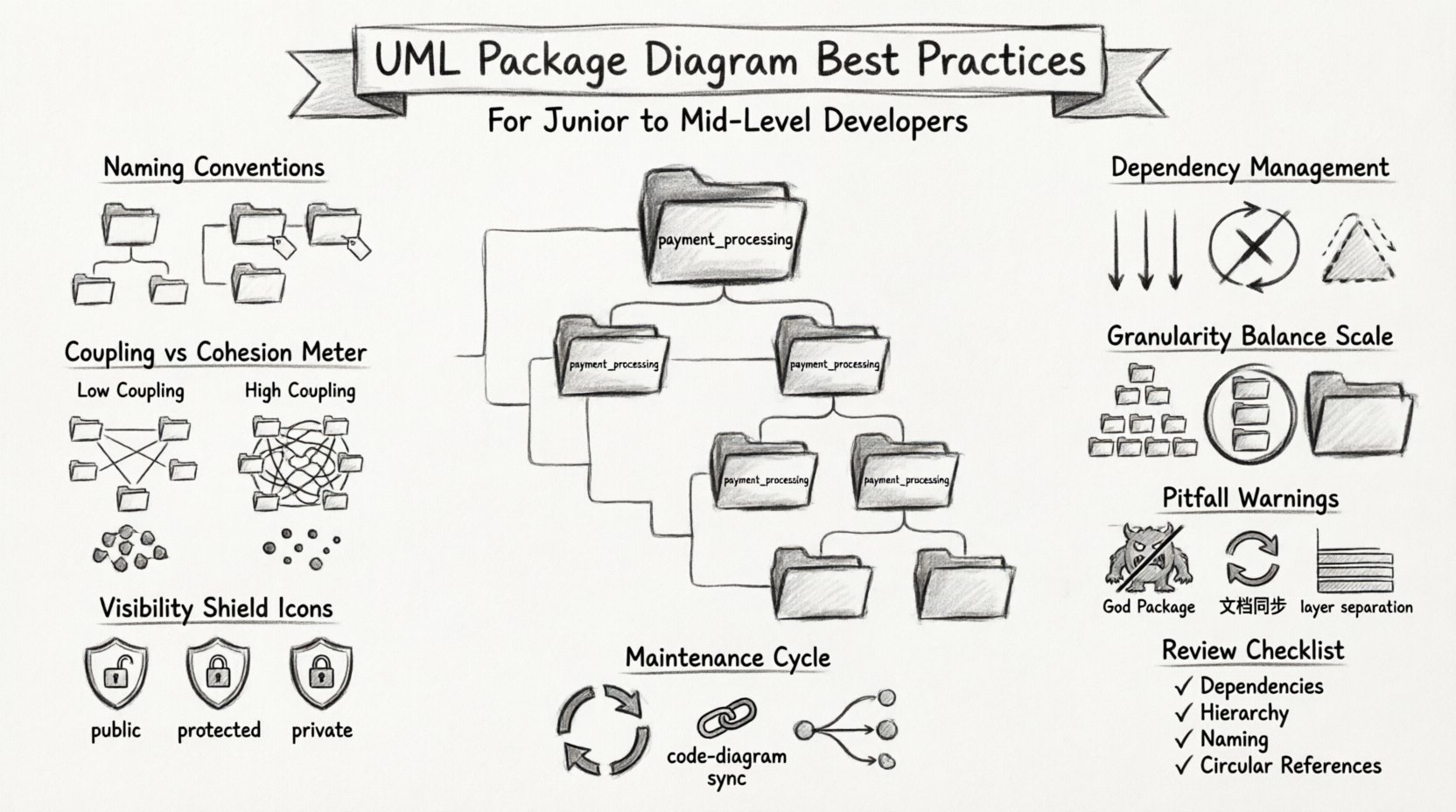
🧱 Understanding UML Package Diagrams
A package is a namespace that organizes a set of related elements. In the context of software design, these elements are typically classes, interfaces, and other packages. Think of a package as a folder in a file system, but with stricter rules about how files inside can interact.
Why Use Package Diagrams?
- Visualization: They offer a bird’s-eye view of the system architecture.
- Communication: They help stakeholders understand the boundaries between different modules.
- Dependency Management: They highlight relationships between different parts of the codebase.
- Documentation: They serve as living documentation for onboarding new team members.
Without a clear package structure, code can become a tangled web. Developers spend more time navigating dependencies than writing logic. A good diagram clarifies where logic belongs and how data flows.
🏷️ Naming Conventions and Hierarchy
Naming is the first line of defense against confusion. A package name should describe its contents without ambiguity. Avoid generic names like util or lib unless the purpose is obvious from context.
Best Practices for Naming
- Use Descriptive Names: Instead of
pkg1, usepayment_processing. - Consistent Case: Stick to a convention, such as
camelCaseorsnake_case. Do not mix them within the same project. - Reflect Structure: Use a hierarchy that mirrors the physical file structure or logical domain boundaries.
- Short but Meaningful: Avoid overly long names, but ensure they convey purpose.
user_authentication_serviceis better thanuser_authif the scope is broad.
Organizing Hierarchy
Structure your packages based on business domains rather than technical layers. This approach, often called Domain-Driven Design, keeps related logic together.
- Domain Packages: Group by business capability (e.g.,
order_management,inventory_system). - Application Packages: Group by functionality (e.g.,
reporting,notifications). - Infrastructure Packages: Group by technology (e.g.,
database_access,file_storage).
When designing your hierarchy, ask yourself: “If I remove this package, does the rest of the system break?” If the answer is yes, it might be too high-level. If the answer is no, it might be too isolated.
🕸️ Managing Dependencies and Coupling
Dependencies define how packages interact. Every line of code in Package A that calls a class in Package B creates a dependency. Managing these relationships is the core challenge of package design.
Understanding Coupling
Coupling refers to the degree of interdependence between software modules. High coupling means changes in one module force changes in another. Low coupling allows modules to change independently.
- Low Coupling: Preferred. Reduces risk and increases flexibility.
- High Coupling: Risky. Makes the system fragile and hard to test.
Managing Dependencies
Use the diagram to visualize dependencies clearly. Avoid cycles where Package A depends on B, and B depends on A.
Dependency Rules
- Dependency Inversion: Depend on abstractions, not concretions. Use interfaces to define contracts.
- Layered Architecture: Ensure dependencies flow in one direction. For example, UI depends on Business Logic, which depends on Data Access. The Data Access layer should not depend on the UI.
- Minimize Public APIs: Only expose what is necessary. Internal classes should not be visible to other packages unless required.
Circular Dependencies
Circular dependencies occur when two packages depend on each other. This creates a loop that can lead to initialization errors or infinite recursion.
- Identify Loops: Look for arrows pointing back to a previously visited package.
- Resolve Loops: Extract the shared functionality into a third package. Both original packages then depend on the new shared package.
📏 Granularity and Scope
Deciding how big a package should be is a common challenge. Packages that are too small create fragmentation. Packages that are too large become monolithic and hard to navigate.
Too Many Small Packages
- Navigation Overhead: Developers spend time finding the right package.
- Overhead: Managing imports and dependencies for tiny units adds complexity.
- Context Switching: Logic for a single feature might be scattered across five packages.
Too Few Large Packages
- File Size: Files become massive and difficult to edit.
- Conflict: Multiple developers working on the same package increase merge conflicts.
- Hidden Complexity: Important relationships get lost in the noise of unrelated code.
Finding the Balance
Aim for packages that represent a single responsibility. If a package contains classes that handle unrelated business rules, split it. If a package contains only one class, merge it with its primary consumer.
🚧 Visibility and Access Control
Not all elements inside a package should be accessible to the outside world. UML allows you to define visibility for package contents.
Visibility Types
- Public: Accessible from any package. Use this sparingly.
- Private: Accessible only within the package. This encapsulates implementation details.
- Protected: Accessible within the package and its subclasses.
Applying Visibility
Encapsulation is key to maintainable code. By restricting visibility, you protect the integrity of your package.
- Hide Implementation: Internal helper classes should be private. Only the main interface should be public.
- Stable Interfaces: Change the internal implementation without breaking the public API.
- Clear Boundaries: Make it obvious what is intended for external use.
⚠️ Common Pitfalls to Avoid
Even experienced developers fall into traps when designing package structures. Awareness of these common mistakes helps you navigate them.
Pitfall 1: The “God Package”
A single package containing all system logic. This creates a bottleneck where every change requires touching the same area. Split this package into logical domains.
Pitfall 2: Over-Documentation
Adding excessive notes or comments to the diagram that do not reflect the code. The diagram should represent the code, not a fantasy of how it should work. If the code changes, the diagram must change immediately.
Pitfall 3: Ignoring the Code
Designing the diagram in isolation and then coding to it. The diagram is a reflection of the code. If the code structure changes, update the diagram. Maintaining a disconnect leads to confusion.
Pitfall 4: Mixing Layers
Putting database logic inside the presentation layer. Keep technical layers separate from business logic layers. This separation allows you to swap technologies without rewriting business rules.
🔄 Maintenance and Synchronization
A diagram is useless if it is outdated. The effort to create the diagram is wasted if no one maintains it.
Strategies for Maintenance
- Automate Generation: Where possible, use tools that generate diagrams from code. This ensures the diagram always matches the source.
- Code Reviews: Include diagram updates in the pull request process. If the package structure changes, the diagram must be updated.
- Regular Audits: Schedule time to review the architecture. Does the current structure still support the business needs?
Version Control
Store your diagram files in the same repository as your code. This ensures they are versioned together. If you revert code, you should be able to revert the diagram to the matching state.
📊 Coupling vs. Cohesion Analysis
To evaluate the quality of your package structure, use the concepts of coupling and cohesion. These metrics help identify structural weaknesses.
| Metric | Definition | Desired State | Impact of Poor Design |
|---|---|---|---|
| Coupling | How much one package depends on another. | Low Coupling | High changes propagate easily across the system. |
| Cohesion | How closely related the elements within a package are. | High Cohesion | Low cohesion makes packages hard to understand and reuse. |
| Dependency Direction | The flow of data and control between packages. | Unidirectional Flow | Circular dependencies cause initialization errors. |
| Granularity | The size and scope of a package. | Balanced Size | Too small causes overhead; too large causes complexity. |
🛠️ Integrating with Development Workflow
Package diagrams should not be a separate activity from coding. They should be part of the daily workflow.
Design First vs. Code First
Some teams prefer to design the diagram before writing code. Others refactor the diagram as the code evolves. Both approaches have merit.
- Design First: Good for complex systems where boundaries need definition early. Prevents architectural drift.
- Code First: Good for agile projects where requirements change frequently. Ensures the diagram matches reality.
Review Process
Include package structure reviews in technical design meetings. Ask questions like:
- Does this new package break existing boundaries?
- Are we introducing new circular dependencies?
- Is the naming consistent with the rest of the system?
📝 Documentation Standards
Documentation within the diagram adds clarity. Use notes to explain complex relationships that arrows cannot convey.
What to Document
- Package Purpose: A brief description of what the package does.
- Key Interfaces: List the main entry points for external packages.
- Constraints: Note any restrictions, such as “This package must not be loaded at startup”.
Keeping it Simple
Do not document every single class. Focus on the package-level relationships. If the code is clear, the diagram should be too. Avoid redundancy.
🔍 Reviewing Your Work
Before finalizing a diagram, run a self-check. This helps catch issues before they become technical debt.
Checklist
- Are all dependencies clearly labeled?
- Is there a clear hierarchy?
- Are there any circular dependencies?
- Is the naming consistent?
- Does the diagram match the current codebase?
- Are public interfaces minimized?
By following these guidelines, you create a structure that supports growth. The diagram becomes a map that guides development rather than a constraint that limits it. Focus on clarity, consistency, and maintainability.
🚀 Moving Forward
Software architecture is a continuous process. As requirements evolve, your package structure may need to adapt. The goal is not to create a perfect diagram once, but to maintain a clear understanding of the system over time.
Start small. Refine your naming conventions. Keep dependencies low. Review your diagrams regularly. With practice, these habits become second nature, leading to more robust and reliable software systems.