


Introduction: Why Data Modeling Matters in Today’s Complex Projects
As someone who has spent over a decade consulting with enterprises on digital transformation initiatives, I’ve witnessed countless projects stumble not because of poor coding or inadequate infrastructure, but because of misaligned data expectations between business stakeholders and technical teams. Early in my career, I learned the hard way that skipping proper data modeling is like building a skyscraper without blueprints—you might get something standing, but it won’t be safe, scalable, or maintainable.
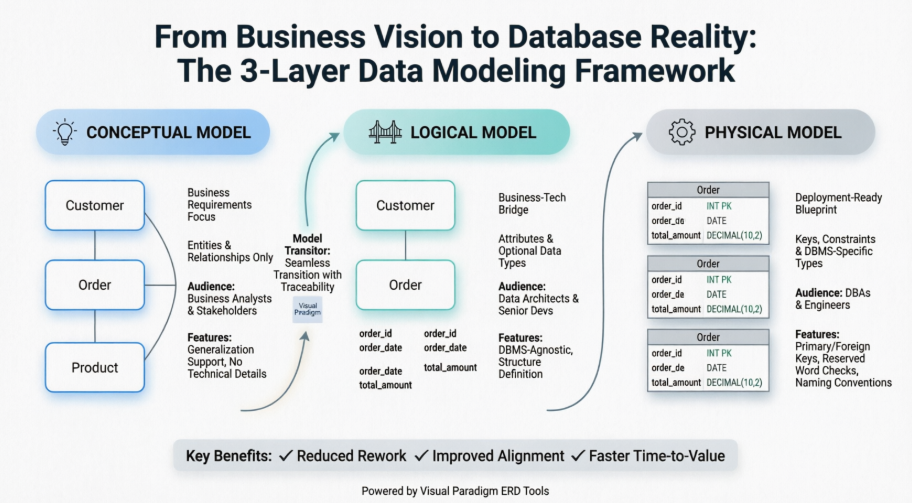
That’s why I was genuinely excited to dive deep into Visual Paradigm’s approach to the three-tiered data modeling methodology: Conceptual, Logical, and Physical ERDs. After implementing this framework across multiple client engagements—from fintech startups to legacy enterprise modernizations—I can confidently share this practitioner’s perspective on how mastering these three modeling layers, supported by the right tooling, transforms chaotic requirements into robust, deployable database architectures.
Understanding the Three Layers: More Than Just Diagrams
Before we explore the tooling, let’s clarify a fundamental insight I’ve shared with dozens of product teams: Conceptual, Logical, and Physical models aren’t just “different versions” of the same diagram. They serve distinct audiences, answer different questions, and evolve through different stakeholders’ hands.
My Rule of Thumb: If your business analyst and your DBA are looking at the same ERD and expecting the same level of detail, you’re already in trouble.
Visual Paradigm elegantly supports this separation of concerns while maintaining traceability between layers—a feature that has saved my teams countless hours during requirement refinement sessions.
Conceptual Model: Speaking the Language of Business
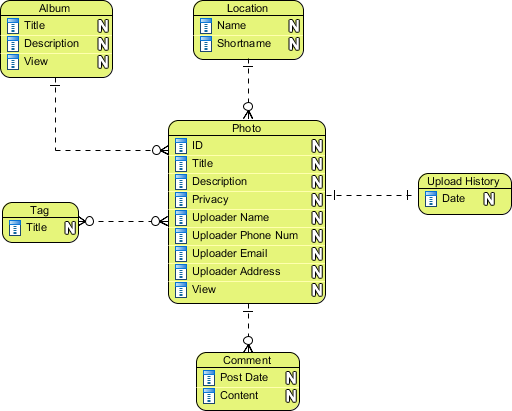
When I first engage with business stakeholders, my goal isn’t to discuss VARCHAR lengths or foreign key constraints. It’s to capture what the business needs, not how it will be implemented. That’s where the Conceptual ERD shines.
 |
|---|
| Conceptual ERD example |
What I Love About Conceptual Modeling in Visual Paradigm:
-
Business-First Vocabulary: Entities like “Customer,” “Order,” and “Product” appear exactly as business users describe them—no technical jargon creeping in prematurely.
-
Generalization Support: This is a standout feature. Being able to model that a “PremiumCustomer” is a kind of “Customer” using generalization (similar to UML inheritance) helps capture business rules visually. Pro tip: Only Conceptual ERD supports this in Visual Paradigm—use it while you can!
-
Simplicity by Design: No column types, no keys, no constraints. Just entities, relationships, and cardinalities. This keeps workshops focused on business logic, not implementation debates.
Real-World Application: On a recent e-commerce platform project, we used the Conceptual ERD to align marketing, sales, and logistics teams on what “Order Fulfillment” actually meant across departments. The visual clarity reduced requirement ambiguity by an estimated 70% before a single line of SQL was written.
Logical Model: Bridging the Business-Tech Gap
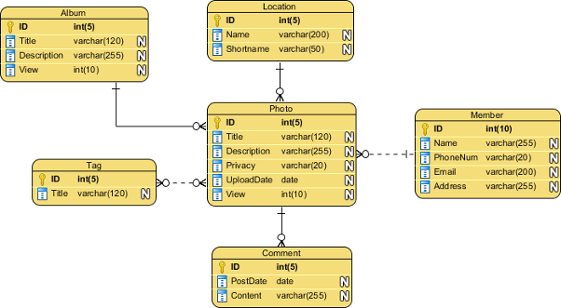
Once business requirements are stabilized, the Logical ERD becomes our “translation layer.” This is where I bring in data architects and senior developers to start thinking about structure—without yet committing to a specific database engine.
 |
|---|
| Logical ERD example |
Why Logical Modeling is My Secret Weapon:
-
Attribute Definition: Now we define columns like
order_date,customer_id, andtotal_amount. This is where business concepts get their first technical shape. -
Optional Data Typing: Visual Paradigm lets you assign data types (e.g., DATE, DECIMAL) at this stage if it aids business analysis. I use this sparingly—only when type ambiguity creates business risk (e.g., “Is price stored with tax or without?”).
-
Still DBMS-Agnostic: Crucially, this model doesn’t care whether you’ll deploy on PostgreSQL, MySQL, or Snowflake. That flexibility is invaluable during vendor evaluation phases.
Consultant’s Insight: I’ve found that teams who skip the Logical layer often end up with Physical models that accidentally encode business rules into database constraints—making future requirement changes exponentially harder. The Logical model acts as a “contract” between business and tech that survives technology swaps.
Physical Model: The Deployment-Ready Blueprint
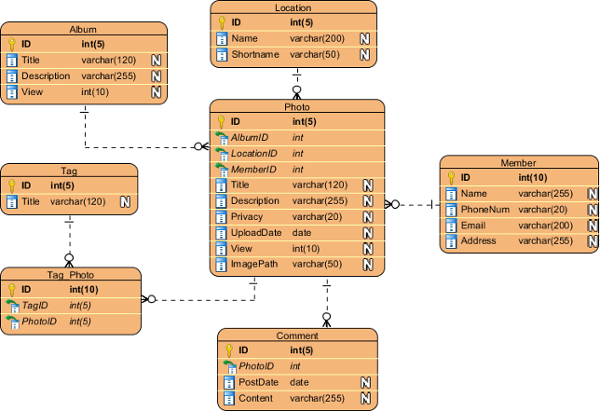
Finally, we arrive at the Physical ERD—the model that your DBA will actually use to generate DDL scripts. This is where theory meets reality, and where Visual Paradigm’s attention to database-specific conventions becomes indispensable.
 |
|---|
| Physical ERD example |
What Makes Physical Modeling in Visual Paradigm Production-Ready:
-
DBMS-Specific Data Types: Switching target from Oracle to SQL Server? Visual Paradigm helps you adjust
VARCHAR2toNVARCHARwith confidence. -
Reserved Word Avoidance: The tool flags entity or column names that conflict with your target DBMS’s reserved keywords—a small feature that prevents big headaches.
-
Keys and Constraints: Primary keys, foreign keys, unique constraints, and check constraints are explicitly modeled. This isn’t just documentation; it’s executable design.
-
Naming Convention Enforcement: I enforce team standards (e.g.,
tbl_prefixes,fk_for foreign keys) at this stage, and Visual Paradigm’s validation rules help maintain consistency.
Hard-Won Lesson: On a healthcare data migration project, we discovered mid-implementation that our Physical model used group as a table name—a reserved word in PostgreSQL. Visual Paradigm’s pre-generation validation caught this before we wasted days debugging syntax errors. That single feature paid for the license.
Seamless Transition: The Model Transitor Advantage
Here’s where Visual Paradigm truly separates itself from basic diagramming tools: the Model Transitor feature. Instead of manually recreating diagrams at each layer (and inevitably introducing inconsistencies), you can programmatically evolve your models while preserving traceability.
My Typical Workflow:
-
Right-click the Conceptual ERD background → Utilities > Transit to Logical ERD…
-
Review the auto-generated Logical model, refining attribute names and adding optional data types
-
Repeat the process to generate the Physical ERD, then customize for the target DBMS
-
Optional but powerful: Use the action bar on the ERD’s right side for one-click transitions
Why This Matters in Practice:
-
Change Propagation: When business requirements shift (and they always do), updating the Conceptual model and re-transiting ensures downstream models stay synchronized.
-
Audit Trail: The transition relationship is maintained, so you can always trace a Physical table column back to its original business concept.
-
Team Collaboration: Business analysts can own the Conceptual layer while DBAs refine the Physical layer—without stepping on each other’s work.
Pro Tip: After transiting, I always rename entities/columns in the new ERD to match technical conventions (e.g., “CustID” instead of “Customer Identifier”) while keeping the conceptual meaning intact. Visual Paradigm makes this renaming safe and traceable.
Real-World Tips from the Trenches
After implementing this methodology across 15+ projects, here are my battle-tested recommendations:
✅ Start Simple, Then Elaborate: Don’t over-engineer the Conceptual model. If business stakeholders can’t validate it in a 30-minute workshop, it’s too complex.
✅ Document Decisions at Each Layer: Use Visual Paradigm’s notes feature to capture why a relationship is optional or why a column uses a specific type. Future you will thank present you.
✅ Leverage AI Wisely: Visual Paradigm’s AI diagram generation (see references below) is great for bootstrapping initial models from text descriptions—but always validate with domain experts. AI suggests; humans decide.
✅ Version Control Your Models: Treat ERD files like source code. I integrate Visual Paradigm projects with Git to track evolution and enable peer reviews.
✅ Train Your Team on the “Why”: Tools are only as good as the people using them. Ensure everyone understands the distinct purpose of each modeling layer—not just how to click the buttons.
Conclusion: Modeling as a Strategic Advantage, Not a Documentation Chore
In an era where data is the new oil, treating data modeling as an afterthought is a strategic risk. My experience with Visual Paradigm’s three-tiered ERD approach has consistently delivered three critical outcomes:
-
Reduced Rework: Clear separation of concerns means business changes don’t trigger database rewrites, and technology swaps don’t break business logic.
-
Improved Stakeholder Alignment: When marketing, engineering, and operations all see their concerns reflected in the appropriate model layer, collaboration improves dramatically.
-
Faster Time-to-Value: The Model Transitor and AI-assisted features accelerate the journey from whiteboard sketches to production-ready schemas without sacrificing rigor.
If you’re still using a single “one-size-fits-all” ERD for all audiences, I encourage you to experiment with this layered approach. Start with a small pilot project, use Visual Paradigm’s free training resources (linked below), and measure the difference in requirement clarity and implementation speed. The investment in disciplined modeling pays dividends in reduced technical debt, happier stakeholders, and systems that evolve gracefully with your business.
Have you tried layered data modeling in your projects? I’d love to hear about your experiences—connect with me on LinkedIn to continue the conversation.
References
- Visual Paradigm ERD Tool Solution: Comprehensive ERD tool solution for database design and modeling
- Database Design with ERD Tools: Professional features for entity relationship diagram creation and database engineering
- OpenDocs ERD AI Generation Release: Announcement of AI-powered ERD generation capabilities in OpenDocs
- AI Diagram Generation Features: AI-powered diagram creation tools including text-to-ERD functionality
- Visual Paradigm Taiwan ERD Solution: Traditional Chinese resource for ERD tool features and capabilities
- Chen Entity Relationship Diagram Editor: Specialized editor for Chen notation ERDs for conceptual modeling
- AI Diagram Generator New Types Release: Update announcing DFD and ERD support in AI Diagram Generator
- Visual Paradigm China ERD Solution: Simplified Chinese resource for ERD tool features
- Visual Paradigm Shop: Product purchasing and licensing information for Visual Paradigm
- Click Start AI Technical Support: Guide for enabling AI features in Visual Paradigm Desktop
- Visual Paradigm OpenDocs Developer Guide: Third-party comprehensive guide to AI-powered documentation with OpenDocs
- AI Process Overview Diagram Generator: Guide to using AI for faster, smarter diagram creation
- What is Entity Relationship Diagram: Educational guide explaining ERD fundamentals and reverse engineering capabilities
- Data Modeling Data Dictionary Tutorial: Tutorial on synchronizing ERDs with data dictionaries
Related posts:
 Comprehensive Guide to Visual Paradigm UML Tools and AI-Powered Modeling
 Visual Paradigm UML Tool: The Complete AI-Powered Modeling Guide for Modern Software Development
 📘 The Ultimate Guide: Sharing Visual Paradigm Flipbooks & Digital Bookshelves to OpenDocs
 Diagram-as-Code vs. Drag-and-Drop vs. AI Diagramming: Which is Right for Your Team?